

Native HubSpot objects — Contacts, Companies, Deals, Tickets — model most B2B businesses well. But when your revenue model doesn't fit the defaults, custom objects are not optional. They are the difference between a CRM that reflects your business and one that distorts it.
- When native objects stop being enough
- What custom objects actually are — and are not
- The decision framework: native vs custom
- Real-world custom object use cases by industry
- Association architecture: the underestimated design challenge
- Custom object properties and required fields
- Reporting on custom objects
- Implementation pitfalls and how to avoid them
When native objects stop being enough
HubSpot's native object model — Contacts, Companies, Deals, and Tickets — was designed around a straightforward B2B SaaS sale: a person at a company becomes a lead, enters a pipeline, and closes as a deal. For many companies, that model is sufficient.
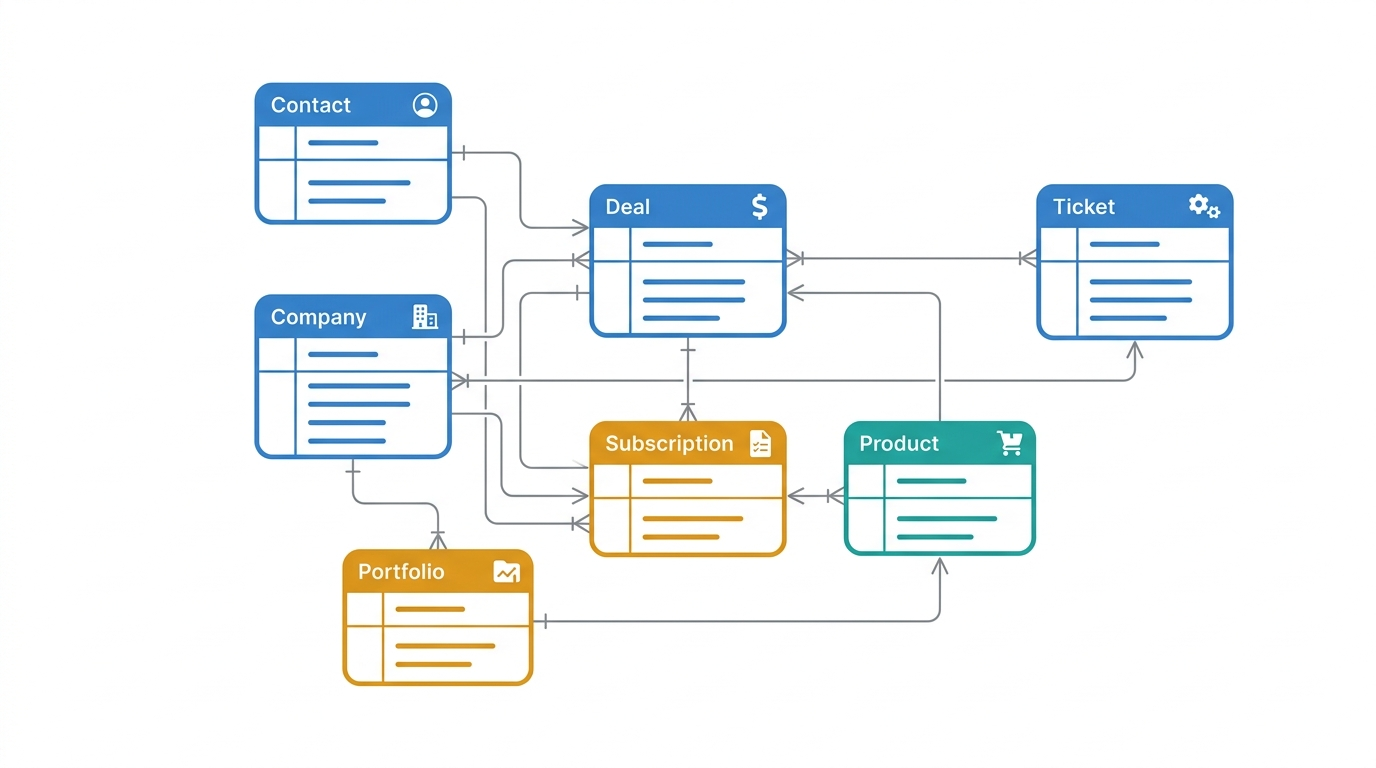
But business reality is more complex. A commercial real estate firm doesn't sell to contacts at companies — it tracks Properties, Leases, and Tenants as distinct entities with their own lifecycles. A financial services firm manages Portfolios, Products, and Relationships that don't map cleanly to Deals. A SaaS company with a product-led growth motion tracks Subscriptions, Workspaces, and Feature Entitlements that exist independently of any individual contact.
When teams try to model these realities using native objects, the compromises compound. Deals get repurposed as Subscription records. Contacts get duplicated to represent different organisational relationships. Custom properties proliferate on the wrong objects. The CRM stops reflecting the business and starts distorting it.
The signal that you need custom objects is not technical complexity — it is when you find yourself using a native object to represent something it was not designed to represent, and the workarounds are accumulating faster than the insights.
What custom objects actually are — and are not
Custom objects in HubSpot are first-class data entities — equivalent in architecture to native objects — that you define to represent concepts specific to your business. They have their own properties, their own records, their own pipelines (if needed), and their own association relationships with other objects.
What they are not: a workaround for missing native functionality, a place to dump data that doesn't fit elsewhere, or a shortcut for avoiding proper data modeling. Custom objects created without a clear data model behind them create the same problems they were meant to solve — just at a higher level of complexity.
Custom objects are available on HubSpot Enterprise plans. Before creating one, the object must be defined with the same rigour as any other architectural decision: what does this object represent, what properties does it carry, how does it associate to other objects, and who is responsible for its data quality?
The decision framework: native vs custom
| Scenario | Use native object? | Recommendation |
|---|---|---|
| Tracking individual sales opportunities | Yes | Use Deal object as intended |
| Tracking multiple subscriptions per account | No | Create Subscription custom object associated to Company |
| Managing support interactions | Yes | Use Ticket object as intended |
| Tracking physical locations, properties, or assets | No | Create Location or Asset custom object |
| Managing partner or reseller relationships | No | Create Partner custom object associated to Company |
| Tracking individual product line revenues | No | Create Product Revenue custom object associated to Deal |
| Managing event registrations and attendance | No | Create Event and Registration custom objects |
| Tracking employee or internal team data | No | Create internal-use custom object with appropriate access controls |
Real-world custom object use cases by industry
Association architecture: the underestimated design challenge
Creating a custom object is the easy part. Designing how it associates to other objects — and what those associations mean — is where most implementations go wrong.
HubSpot supports associations between any object and any other object, including custom-to-custom associations. The architecture questions you must answer before creating associations are:
- Cardinality: Is this a one-to-one, one-to-many, or many-to-many relationship? A Subscription associated to one Company is different from a Product that can be associated to many Deals across many Companies.
- Directionality: Which object is the primary record, and which is secondary? This affects how records appear in views, how reports aggregate, and how automation triggers work.
- Association labels: HubSpot allows you to label associations (e.g., "Primary contact" vs "Decision maker" vs "Technical evaluator" on a Deal-to-Contact association). Use these deliberately — they carry business meaning that unlocks more precise reporting.
The most common custom object association mistake: creating a many-to-many relationship without defining what the association itself represents. If a Product can be associated to many Deals, and a Deal can have many Products, the association carries data — quantity, price, discount — that must live somewhere. In HubSpot, that data lives on the association itself using association properties, not on either object record.
Custom object properties and required fields
Custom objects support all the same property types as native objects: single-line text, multi-line text, number, date, dropdown select, multi-select, checkbox, file, and calculated properties. The design principles for custom object properties mirror those for native object properties — but with stricter governance, because custom objects are less visible to the average HubSpot user and therefore more vulnerable to neglect.
For every custom object, define a minimum required property set — the fields without which the record is operationally incomplete. In HubSpot, you can enforce required properties at the record creation stage using property validation rules. Do this. An incomplete custom object record is often worse than no record — it creates the illusion of data without the substance.
— Subscription ID (external, text)
— Plan tier (dropdown: Starter / Professional / Enterprise)
— MRR (number, currency)
— Contract start date (date)
— Renewal date (date)
— Billing frequency (dropdown: Monthly / Annual)
— Associated company (association, required)
— Owner (HubSpot user)
Reporting on custom objects
Custom objects are fully reportable in HubSpot using the custom report builder. You can build reports that count records, aggregate numeric properties, filter by association type, and cross-reference custom objects with native objects in the same report.
The practical reporting capabilities this unlocks include:
- MRR by subscription tier, filtered by company size or industry
- Portfolio company performance aggregated by investment year or sector
- Product revenue breakdown per deal, per sales rep, per quarter
- Event attendance rates correlated with subsequent deal creation
The constraint to be aware of: custom object data does not appear in HubSpot's pre-built dashboards. All custom object reporting requires the custom report builder, which means your RevOps team — not casual users — will be building and maintaining these reports.
Implementation pitfalls and how to avoid them
- Creating custom objects to avoid data governance. If your Contacts are messy, creating a custom object to store "clean" contact data alongside the native object doubles your problem. Fix the governance on native objects first.
- Overbuilding at the start. Create the minimum viable custom object — the properties you will actively use in the first 90 days. Add properties as the need becomes real, not as the need is hypothesised.
- No ownership assigned. Every custom object needs a data steward. Without one, the object will be populated inconsistently and its data will degrade within six months.
- Ignoring API implications. If you are syncing custom object data from an external system, the API schema must be designed before the object is created in HubSpot. Retrofitting an API integration to a custom object schema that was built without it in mind is expensive.
- Not documenting association meaning. Six months after go-live, the people who built the associations may have left. If association labels and cardinality are not documented, the next person maintaining the CRM will make incorrect assumptions about what the relationships mean.
Custom objects are an architectural investment, not a configuration task. Build them with the same rigour you would apply to a database schema — because that is precisely what they are.