
Most HubSpot setups are built for the company you were, not the company you're becoming. Here's how to architect a system that scales without breaking.
In this article
- Why most HubSpot setups break at scale
- What scalable RevOps architecture actually means
- The four structural layers of a HubSpot RevOps system
- Mid-market vs enterprise: where the architecture diverges
- Five decisions you must make before building
- What good looks like: a reference architecture
- Where to start if you're rebuilding
You didn't build your HubSpot wrong. You built it for where you were — a lean team, a single product, a predictable sales motion. Then the company grew. You added a customer success team. Then a second product line. Then a partner channel. Then someone from finance wanted a pipeline report that didn't exist.
Suddenly your CRM is a patchwork. Contacts live in three lifecycle stages simultaneously. Marketing is working off a different lead definition than Sales. Operations is exporting to spreadsheets because HubSpot "can't do" what they need — except it can, it just wasn't built to.
This is not a HubSpot problem. It's an architecture problem. And it's the most common reason RevOps transformations stall.
The #1 cause of HubSpot failure at scale is not the tool — it's the absence of a deliberate data model built before workflow automation begins.
What scalable RevOps architecture actually meansRevOps architecture is the deliberate design of how your revenue-generating teams — Marketing, Sales, and Customer Success — share data, hand off leads, measure performance, and operate inside a single platform.
In HubSpot specifically, this means four things are intentionally designed rather than accumulated:
- Your object model (what records exist and how they relate)
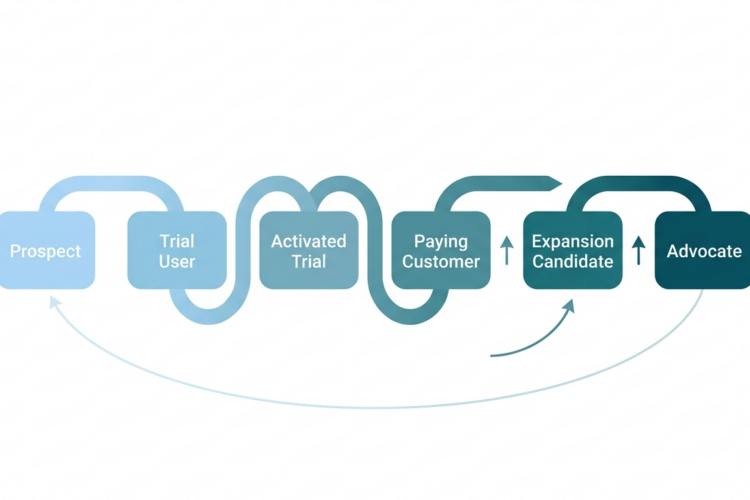
- Your lifecycle and pipeline logic (how buyers move through your system)
- Your property and data governance (what fields exist, who owns them, what populates them)
- Your automation layer (what triggers what, and under what conditions)
When these four are designed together, HubSpot behaves like an enterprise revenue system. When they're built independently over time, HubSpot becomes a liability rather than an asset.
The four structural layers of a HubSpot RevOps system
Layer 1: the data foundation
Everything in HubSpot sits on top of your object model. Contacts, Companies, Deals, Tickets — these are the native objects. For most mid-market companies, they're sufficient. For enterprise, you'll almost certainly need Custom Objects.
The critical question is not "what objects do we have?" but "what relationships exist between those objects, and does HubSpot's association model reflect reality?" A deal associated to the wrong contact, or a company with duplicate records, doesn't just create messy reports — it breaks attribution, distorts pipeline, and erodes trust in the system.
Layer 2: lifecycle architecture
HubSpot's default lifecycle stages (Subscriber, Lead, MQL, SQL, Opportunity, Customer, Evangelist) are starting points, not mandates. For most scaling companies, the real journey is more nuanced: a lead from a webinar behaves differently than a lead from an inbound demo request. An enterprise deal moves through stages a mid-market deal skips entirely.
Your lifecycle architecture must reflect your actual go-to-market motion, not HubSpot's default template. This includes defining the precise entry and exit criteria for every stage — in writing, agreed upon by both Marketing and Sales — before any automation is built.
Layer 3: the automation layer
Automation in HubSpot is powerful and dangerous in equal measure. The most common mistake is building workflows before data governance is complete. The result: automations trigger on dirty data, create duplicate records, enroll contacts incorrectly, and generate support tickets faster than they generate pipeline.
The rule is simple: data model first, lifecycle logic second, automation third. Never in reverse.
Layer 4: reporting and intelligence
Reporting is not a layer you add at the end. If your data model doesn't capture the questions leadership will ask, no amount of dashboard building will fix it retroactively. The reporting layer must be designed backwards — start with the board-level metrics and work down to the property level to ensure every metric can be computed from data HubSpot actually holds.
Mid-market vs enterprise: where the architecture diverges
The structural difference between a mid-market and enterprise HubSpot architecture is not complexity — it's governance. Mid-market companies can move fast and fix mistakes. Enterprise companies cannot afford to move fast without controls.
1–3
Teams in mid-market HubSpot
6–12
Teams in enterprise HubSpot
5×
More custom objects in enterprise setups
In enterprise, you need property-level governance (who can edit what), role-based access, multi-team pipeline architecture, and a clear data steward who owns the CRM as a system. In mid-market, the priority is clean fundamentals that won't need to be rebuilt when headcount doubles.
Five decisions you must make before building- What is your single source of truth for contact identity? Email address? HubSpot contact ID? An external customer ID synced from your product? This decision cascades through every integration you build.
- Who owns lifecycle stage changes? Marketing, Sales, or a system rule? Disagreement here is the most common cause of pipeline report disputes.
- How will you handle duplicate records? Prevention-first (dedup at point of entry) or remediation (merge workflows after creation)? Both require deliberate tooling.
- What does "customer" mean in HubSpot? At what point does a deal win trigger a lifecycle change? Who sets it and who verifies it?
- Which teams have write access to which objects? A CS rep who can overwrite MQL status because they have broad CRM access is a governance failure, not a training problem.
These five decisions are not technical. They are organisational. No HubSpot architect can make them for you — they require alignment between Marketing, Sales, and Operations leadership before a single workflow is built.
What good looks like: a reference architecture
A well-architected HubSpot setup for a scaling B2B company typically looks like this:
- Native objects (Contact, Company, Deal, Ticket) are clean, deduplicated, and governed by clear ownership rules
- Custom Objects exist only where native objects genuinely cannot model the business relationship
- Lifecycle stages have written entry/exit criteria signed off by Marketing and Sales jointly
- Workflows are documented externally (not just in HubSpot) with owner, trigger logic, and last-reviewed date
- Reporting dashboards are built from a reporting spec, not assembled ad hoc
- A data steward (person or team) reviews CRM health quarterly using HubSpot's data quality tools
Where to start if you're rebuilding
If you're inheriting a broken HubSpot setup, the instinct is to clean everything at once. Resist it. Start with a three-step audit:
- Data health audit: How many duplicate contacts exist? What's your average property completion rate? Are lifecycle stages being populated or left blank?
- Workflow audit: Which workflows are active, which are paused, and which are enrolling contacts incorrectly? A single misconfigured workflow can corrupt data across thousands of records.
- Alignment audit: Can Marketing and Sales independently produce the same pipeline number from HubSpot? If not, you don't have a data problem — you have a definition problem.
From there, rebuild in layers: data model, then lifecycle, then automation, then reporting. In that order. Every time.