Most HubSpot implementations do not fail because the tool is wrong for the business. They fail in predictable ways, at predictable stages, for reasons that could have been prevented. Here are the eight failure patterns — and the specific fixes for each.
In this article
- The uncomfortable truth about implementation failure
- Failure 1: No data model before configuration
- Failure 2: Misaligned lifecycle definitions
- Failure 3: Automation built on dirty data
- Failure 4: No governance ownership
- Failure 5: Integration architecture as an afterthought
- Failure 6: Reporting built before data is clean
- Failure 7: Change management ignored
- Failure 8: Rebuilding instead of inheriting
- The implementation health checklist
The uncomfortable truth about implementation failure
HubSpot is one of the most capable revenue platforms available to mid-market and enterprise companies. It is also one of the most commonly misimplemented. Not because the tool is difficult — it is deliberately designed to be accessible. But because accessibility creates a specific kind of overconfidence: the belief that ease of configuration equals low risk of failure.
It does not. The most dangerous HubSpot implementations are the ones that were built quickly, because speed in the wrong direction produces infrastructure that is expensive to fix and politically difficult to rebuild.
What follows are the eight failure patterns that appear most consistently across struggling HubSpot RevOps implementations — and the specific, actionable fixes for each.
If you recognise your current HubSpot setup in more than three of these failure patterns, you are not dealing with isolated problems — you are dealing with a systemic architecture issue. Fixing individual symptoms without addressing the root cause is how teams spend years in a rebuild cycle.
Failure 01
No data model before configuration
How it presents
Properties accumulate on the wrong objects. Custom fields duplicate native ones. Reports cannot be built because the data doesn't exist in the right place. Admins describe HubSpot as "a mess" without being able to explain why.
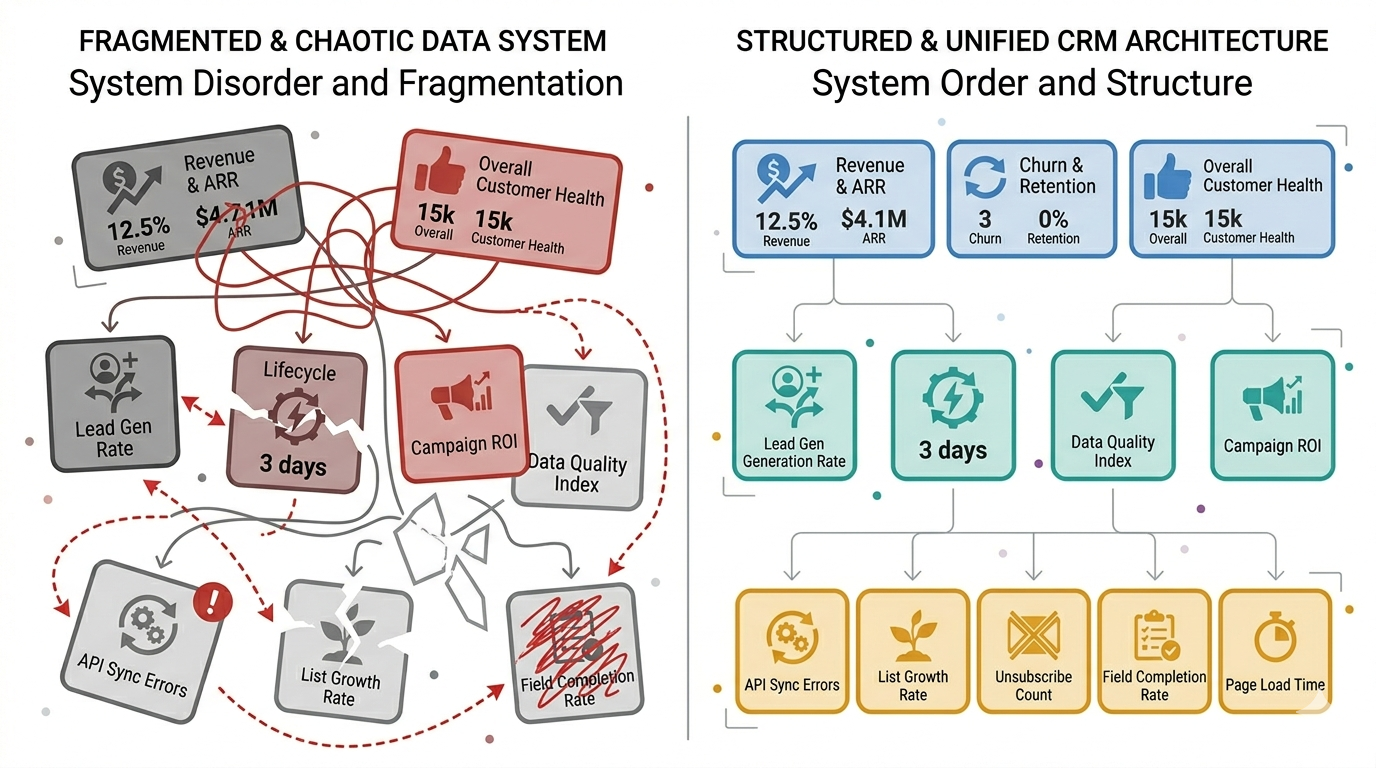
This is the foundational failure from which all other failures branch. Configuration began before anyone answered the questions: what objects do we need, what properties live on each, how do they associate, and what is the canonical identifier for each record type? Without those answers in writing, every subsequent decision is made by individual users with individual interpretations — and the cumulative result is incoherence.
The fix
Pause new configuration. Document the current state in a data model audit: list every object, every property in active use, and every integration writing to HubSpot. Then build a target state data model — agreed in writing by RevOps, Marketing, and Sales — before resuming configuration. This takes two to three weeks. It saves six to twelve months of reactive cleanup.
Failure 02
Misaligned lifecycle definitions
How it presents
Marketing reports a strong MQL month. Sales says lead quality is terrible. Both are right. The word "MQL" means different things to each team — and HubSpot is faithfully implementing Marketing's definition while Sales is judging against their own.
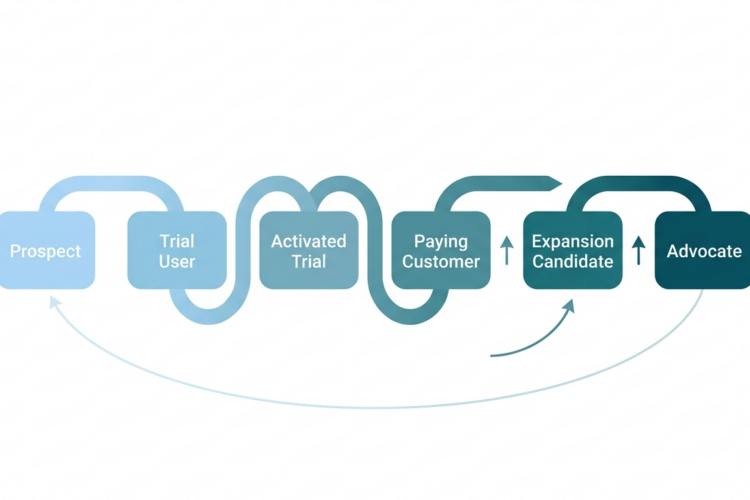
Lifecycle stage misalignment is the most common cause of Marketing-Sales tension in HubSpot organisations. It is almost never a people problem. It is a definitions problem — one that was never resolved because it felt like a political conversation rather than a technical one. But it is both: the definitions must be agreed organisationally, and then they must be enforced technically in HubSpot's lifecycle architecture.
The fix
Convene a lifecycle definition workshop with Marketing, Sales, and RevOps. Document entry and exit criteria for every stage in plain language. Get sign-off from both VP of Marketing and VP of Sales. Then implement those criteria as HubSpot workflow conditions — not as guidelines, but as enforced rules. Review the definitions every six months as the business evolves.
Failure 03
Automation built on dirty data
How it presents
Workflows are running but producing wrong outcomes. Contacts are enrolling in sequences they should not be in. Deals are being assigned to the wrong owner. Lead scores are meaningless. The team loses confidence in automation and starts bypassing it manually.
Automation amplifies whatever data it runs on. If the underlying contact and company data is incomplete, incorrectly formatted, or duplicated, automation does not compensate for those problems — it compounds them, at scale, faster than any manual process could. A workflow that enrolls five thousand contacts based on a property that is only 40% populated is not doing five thousand correct things. It is doing five thousand potentially wrong things.
The fix
Never activate a workflow against a property that has less than 80% completion on your active contact base. Run a data quality sprint before building automation: complete the critical properties, deduplicate the key records, validate the lead scoring model. Only then build the automation layer on top of it. The sequence is non-negotiable: data quality first, automation second.
Failure 04
No governance ownership
How it presents
Everyone has admin access. Properties are created by anyone with an idea. Workflows are built and abandoned. No one can explain why a specific automation exists. The portal feels like a shared document that everyone edits and no one owns.
HubSpot without governance ownership is not a CRM. It is a collaborative database with no schema enforcement. The technical capabilities of the platform are irrelevant if the organisational structure to govern them does not exist. Governance is not bureaucracy — it is the precondition for the system remaining trustworthy over time.
The fix
Designate a HubSpot data steward — a named individual or team responsible for property creation, workflow approval, integration oversight, and quarterly audits. Reduce admin access to the people who need it for their role, not everyone who wants it for convenience. Implement a change request process for new properties and workflows. This feels like overhead until the first time it prevents a data catastrophe.
Failure 05
Integration architecture as an afterthought
How it presents
Data from the billing system contradicts data in HubSpot. Customer records in the support tool don't match the CRM. Integrations were installed as point solutions and never designed as a system. Data flows in one direction, gets stale, and creates a secondary source-of-truth problem.
Integrations are not plug-and-play additions to a working HubSpot setup. They are architectural components that must be designed as part of the data model — with defined field mappings, sync frequency, conflict resolution rules, and error handling. An integration that was installed to solve an immediate pain point, without addressing these questions, creates three new pain points for every one it solves.
The fix
Document every integration currently connected to HubSpot: what data flows in, what flows out, how often, and what happens when the same field is updated in both systems simultaneously. For each integration, define a master record rule — which system wins in a conflict. Review integration health monthly using Operations Hub's data sync logs. Treat integration architecture as infrastructure, not configuration.
Failure 06
Reporting built before data is clean
How it presents
Leadership asks for a pipeline report. Someone builds one from available data. The data is incomplete. Leadership makes a decision based on the report. The decision is wrong. Trust in HubSpot — and the RevOps function — erodes. The team defaults to spreadsheets.
Reports built on incomplete data do not produce incomplete insights. They produce confidently wrong ones — because dashboards carry an implied authority that raw data does not. A bar chart showing pipeline by source looks authoritative even when the underlying source attribution is only 50% complete. The people reading it do not know it is half-empty.
The fix
Before publishing any HubSpot report to leadership, document its data completeness rate. If a report relies on a property that is less than 85% populated, that fact must appear in the report itself — as a footnote, a caveat, or a data quality indicator. Build the data quality layer first. Publish reports only when you can stand behind their completeness.
Failure 07
Change management ignored
How it presents
The new HubSpot setup was technically excellent. Adoption is 30%. Reps are still logging activities in a spreadsheet. Marketing is sending emails from a separate tool. The system is correct and unused.
A HubSpot implementation is not complete when the technical build is done. It is complete when the people who need to use it are using it correctly and trusting the data it produces. Change management is not a soft skill add-on to a RevOps project — it is a core deliverable. The best-architected CRM in the world fails if the humans in the system reject it.
The fix
Include change management as a line item in every implementation plan. Identify the five to eight people whose adoption determines whether the implementation succeeds — usually the most influential reps and the VP of Sales. Involve them in design decisions before the build, not after. Run role-specific training, not generic "here is how HubSpot works" sessions. Measure adoption metrics — login frequency, property completion rates, workflow enrollment accuracy — for the first 90 days post-launch.
Failure 08
Rebuilding instead of inheriting
How it presents
A new RevOps hire or implementation partner arrives, declares the existing setup unsalvageable, and rebuilds from scratch. The rebuild takes eight months. During the rebuild, the old system degrades further. The new system launches into an organisation that has forgotten how to use it.
The instinct to start fresh is understandable — inheriting a broken HubSpot setup is genuinely frustrating. But most broken setups are not unsalvageable. They are fixable in layers, starting with the data model and working upward. A full rebuild is almost always slower, more expensive, and more disruptive than a structured remediation. And it carries the same risks of failure if the underlying governance and alignment problems are not addressed.
The fix
Before recommending a rebuild, complete a structured audit: data health, workflow inventory, integration architecture, lifecycle definition status. Categorise everything as keep, fix, or remove. In most cases, the keep and fix categories account for 70% or more of the existing configuration — meaning a rebuild is unnecessary. Rebuild only what genuinely cannot be fixed. Preserve what works. The organisation has institutional knowledge embedded in the existing setup that a rebuild discards entirely.