
A private equity firm's operating partner sits down for a monthly portfolio review. They open five different dashboards — one per portfolio company — and begin manually assembling a cross-portfolio picture in a spreadsheet. This is the default state of PE portfolio reporting. It is slow, error-prone, and tells the operating team nothing they could not have learned 48 hours earlier if the reporting infrastructure existed to surface it automatically.
- Why cross-portfolio reporting breaks at the data layer
- The three-layer reporting architecture for PE portfolios
- The GP dashboard: what belongs at the portfolio level
- The operating partner dashboard: company-level intervention signals
- Standardising KPIs across portfolio companies
- HubSpot Business Units vs separate portals: the reporting implications
- Building the reporting data pipeline
- Early-warning flags: automating portfolio risk detection
Why cross-portfolio reporting breaks at the data layer
The instinct when a PE firm wants cross-portfolio revenue reporting is to build a dashboard. The problem is not the dashboard — it is the data the dashboard is trying to aggregate. When each portfolio company has defined its pipeline stages, revenue metrics, and lifecycle criteria independently, the numbers that flow into a cross-portfolio view are not comparable. Aggregating them produces a number that is statistically valid and analytically meaningless.
Consider the most common example: ARR. Company A defines ARR as annual contract value at signature. Company B defines it as recognised revenue in the trailing twelve months. Company C includes expansion revenue in its ARR figure; Company D does not. A cross-portfolio ARR dashboard that sums these three numbers does not show total portfolio ARR — it shows three different metrics with the same label, added together.
This is why the reporting architecture problem in PE portfolio management is inseparable from the data standardisation problem covered in Blog 13. The dashboard is the output. The data dictionary is the prerequisite. Attempting to build the output before the prerequisite is in place produces a dashboard that looks impressive and misleads consistently.
The single most common cross-portfolio reporting failure: a PE operating team commissions a BI dashboard that pulls data from all portfolio company HubSpot portals via API. The dashboard is built in six weeks. It is shared with the investment committee. Within one quarter, two portfolio companies dispute the numbers it shows for them. The dashboard is quietly abandoned. Six months of development investment is wasted — not because the dashboard was wrong, but because the data it was built on was not standardised. The sequence must be: data dictionary first, reporting architecture second, dashboard third.
The three-layer reporting architecture for PE portfolios
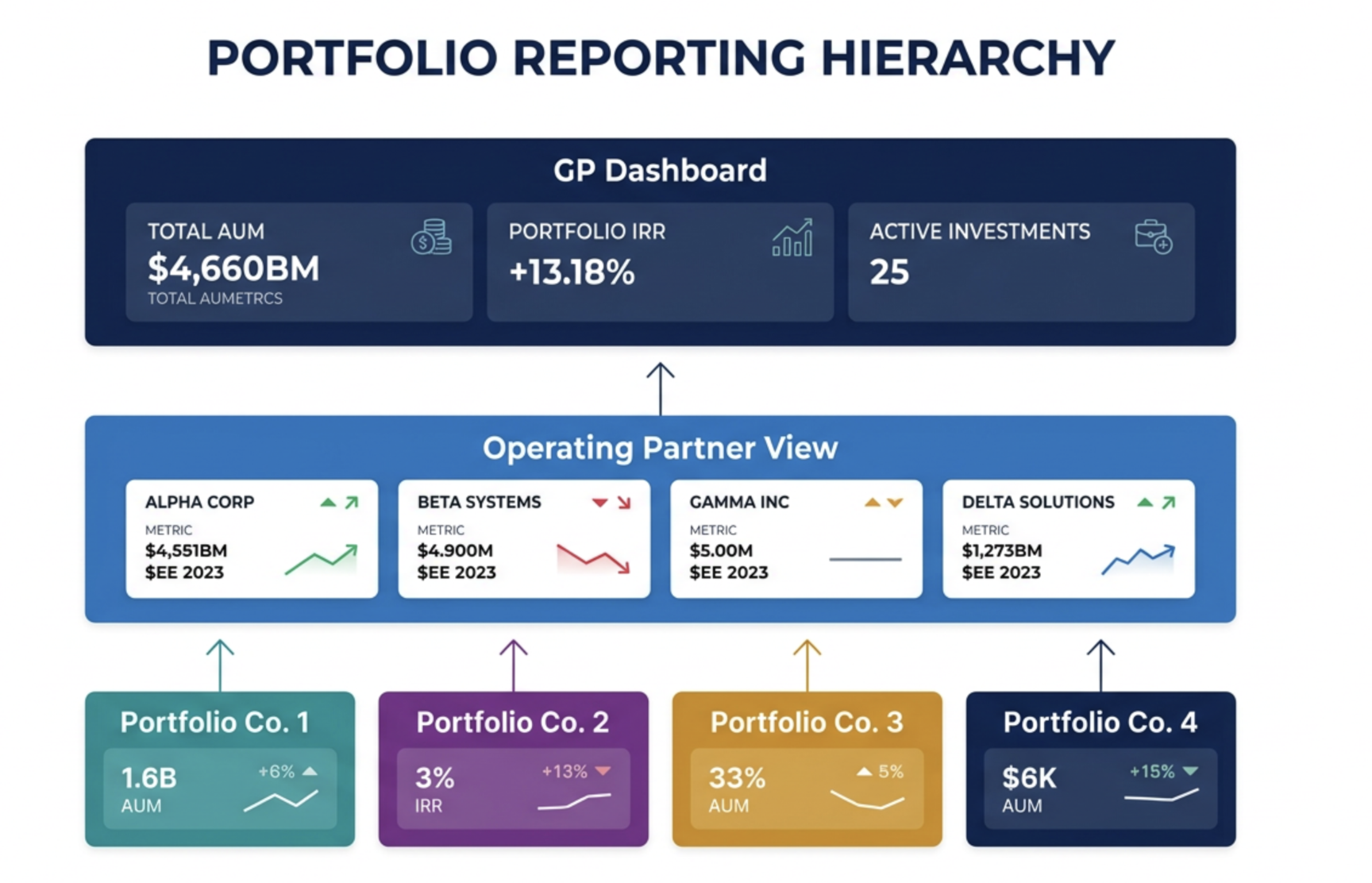
A well-designed PE portfolio reporting system has three distinct layers, each serving a different audience at a different cadence. Building all three simultaneously — or conflating them into a single dashboard — is the most common design failure.
The separation of these three layers is not cosmetic — it is architectural. The data that feeds each layer is different, the access permissions are different, and the action it triggers is different. A GP-level dashboard that drills down to individual deal records is not a better dashboard — it is a confused one that serves no audience well. Design each layer for its specific audience and stop there.
The GP dashboard: what belongs at the portfolio level
The GP-level dashboard has one job: to tell the investment committee whether the portfolio's revenue trajectory supports the fund's return thesis. Everything on this dashboard should answer that question directly or be removed.
The GP dashboard should have no more than eight metrics. Every metric added beyond eight reduces the chance that the critical ones are acted upon. The discipline is in what is excluded — not what is included. If a metric does not directly inform a fund-level decision, it belongs in the operating partner layer, not the GP layer.
The operating partner dashboard: company-level intervention signals
The operating partner's job is to identify which portfolio companies need active intervention before the problem appears in the GP-level numbers. This requires a dashboard that shows each company's KPIs side by side, with trend lines and threshold-based flags that highlight deterioration before it becomes material.
Standardising KPIs across portfolio companies
Each KPI that appears on the operating partner and GP dashboards must have a single, written definition that applies identically across all portfolio companies. The KPI definition document is not a technical specification — it is a governance document that prevents the reporting disputes that make cross-portfolio dashboards politically contentious.
| KPI | Standard definition | Common variation to exclude |
|---|---|---|
| ARR | Annualised value of all active subscription contracts as of the last day of the reporting period, excluding one-time fees, professional services, and discounts that expire within 12 months | Do not include TCV, pipeline ARR, or contracts signed but not yet live |
| NRR | (Opening ARR + expansion ARR − contraction ARR − churned ARR) ÷ Opening ARR × 100, measured over a trailing 12-month period | Do not net new logo ARR into the NRR calculation — it masks retention performance with acquisition volume |
| Pipeline coverage | Sum of deal amounts in stages 2–5 (qualified through proposal) ÷ remaining ARR target for the period. Stage 1 (prospecting) excluded from coverage calculation | Do not include unqualified or stalled deals past a defined age threshold in the coverage numerator |
| Win rate | Closed-won deals ÷ (closed-won + closed-lost deals) in a given period, excluding deals lost due to "no decision" or "timing" | Do not exclude competitive losses from the denominator — they must be counted to produce a meaningful win rate |
| CAC payback | Total sales and marketing spend in a period ÷ new ARR added in that period × 12. Expressed in months. | Do not include CS or account management costs in the numerator — they measure retention cost, not acquisition cost |
HubSpot Business Units vs separate portals: the reporting implications
HubSpot's Business Units feature — available on Enterprise plans — allows multiple brands or divisions to operate within a single HubSpot portal with separate branding, separate subscription management, and separate reporting views. For PE firms managing portfolio companies that are in the same industry or share customer relationships, Business Units can consolidate the reporting architecture within a single portal.
The reporting implications of each model:
Business Units (single portal):
+ Native cross-unit reporting in HubSpot's dashboard builder
+ Single admin layer, shared workflow library
+ No API integration required for cross-portfolio data
− All companies must accept same HubSpot configuration constraints
− User access and data separation requires careful permission design
− Not suitable if companies have data residency requirements in different regions
Separate portals (federated):
+ Full configuration autonomy per company
+ Data residency requirements manageable per portal
+ Company-level data is cleanly separated
− Cross-portfolio reporting requires HubSpot API + BI tool layer
− Higher admin overhead across multiple portals
− Standardisation must be enforced through governance, not platform constraints
Recommendation:
Business Units → same industry, same market, shared customers
Separate portals → different markets, different business models, different geographies
Building the reporting data pipeline
For the federated model — separate portals per portfolio company — the cross-portfolio reporting layer requires a data pipeline that extracts standardised KPIs from each HubSpot portal and aggregates them into the GP and operating partner dashboards. The three common approaches:
Option 1: HubSpot API + BI tool
Extract data from each portfolio company's HubSpot portal via the HubSpot Reporting API or CRM API. Load into a BI tool — Looker, Power BI, Tableau, or Metabase. Build cross-portfolio dashboards in the BI layer. This is the most flexible approach and the most technically demanding. Requires a data engineer or RevOps professional with API experience to build and maintain the pipeline. Best for portfolios with four or more companies where reporting requirements are complex.
Option 2: HubSpot + Google Sheets / Excel via Operations Hub
Use Operations Hub workflows to push standardised KPI data to a Google Sheet or Excel workbook on a defined schedule. The spreadsheet becomes the aggregation layer — manually or formula-driven — and the GP dashboard is built on top of it. Lower technical overhead, higher manual maintenance. Suitable for smaller portfolios (two to three companies) where reporting requirements are straightforward and the operating team is comfortable in spreadsheets.
Option 3: Dedicated portfolio analytics platform
Tools such as Visible.vc, Allvue, or Cobalt are purpose-built for PE portfolio reporting. They connect to HubSpot and other data sources, aggregate at the portfolio level, and provide pre-built investor reporting templates. Higher cost than building in-house but lower ongoing maintenance. Best for PE firms where portfolio reporting is a recurring deliverable to LPs, not just an internal operating tool.
Early-warning flags: automating portfolio risk detection
The highest-value capability in a cross-portfolio reporting system is not the dashboard itself — it is the automated flagging that alerts the operating partner to a deteriorating portfolio company before the next scheduled review. Manual dashboard reviews catch problems monthly. Automated threshold flags catch them within days of the data changing.
These early-warning flags are not built inside HubSpot — they are built in the BI or analytics layer that sits above it, pulling standardised KPI data from each portfolio company's portal. The flags are only as reliable as the data they are built on — which is why the data dictionary standardisation in Blog 13 is the prerequisite for everything in this blog. Automated flags on non-standardised data produce automated noise, not automated intelligence.
→The KPI definitions and measurement framework underlying this reporting architecture are established in Article: RevOps KPIs every scaling company should track in HubSpot.