
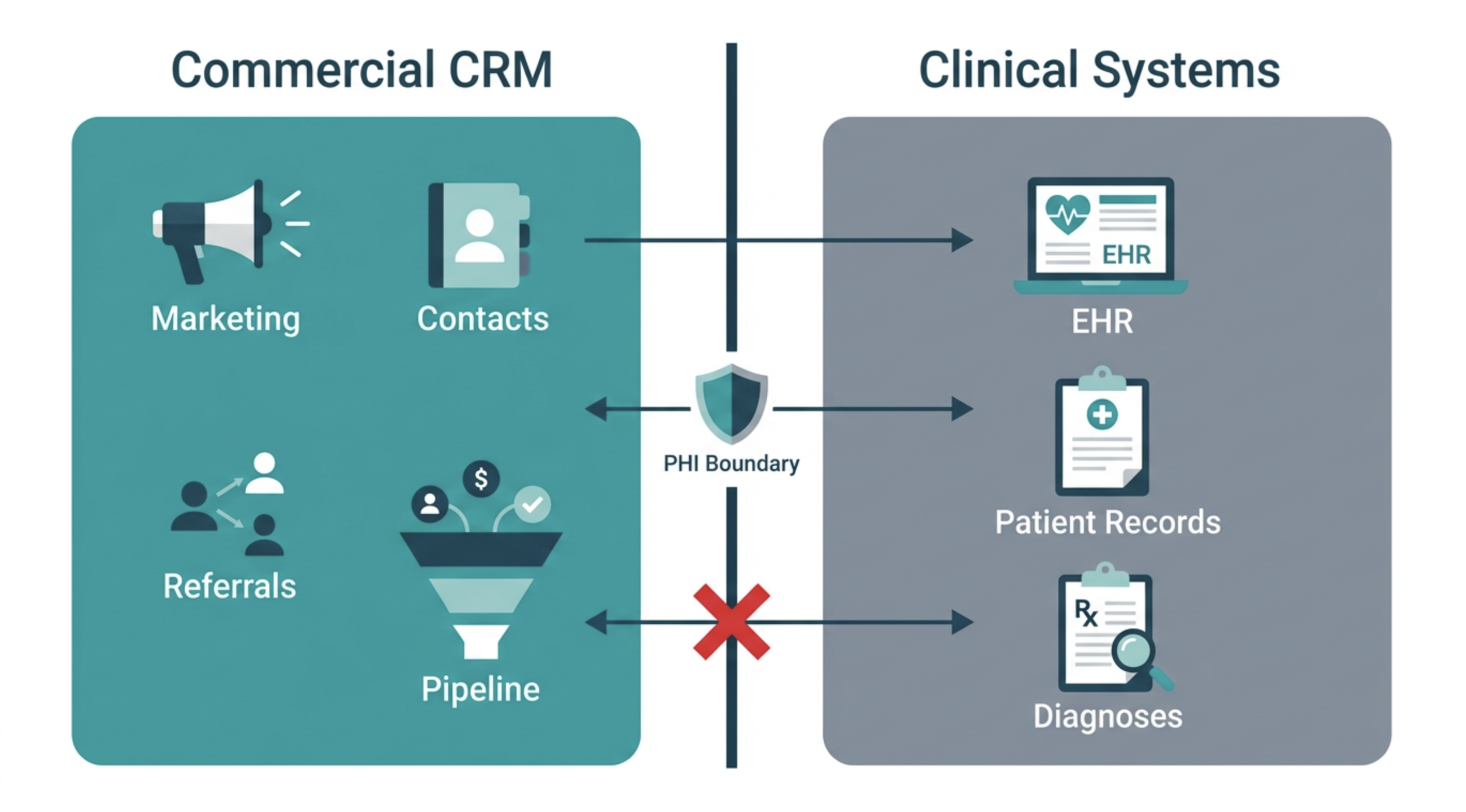
HubSpot is not HIPAA-compliant out of the box. That statement alone disqualifies it from consideration in many healthcare organisations — often incorrectly. With the right architecture, a signed Business Associate Agreement, and deliberate data boundary design, HubSpot can serve as a powerful commercial CRM while keeping protected health information exactly where it belongs: out of it.
- The HIPAA and HubSpot relationship — what is actually true
- Healthcare segments that can use HubSpot effectively
- The PHI boundary: what must never enter HubSpot
- The BAA — what it covers and what it does not
- Designing HIPAA-aware data flows
- CRM architecture: objects, properties, and associations
- What healthcare organisations can automate safely
- The compliance audit checklist
The HIPAA and HubSpot relationship — what is actually true
The most important clarification for any healthcare organisation evaluating HubSpot: HIPAA compliance is not a property of a software platform. It is a property of how an organisation uses that platform. A CRM is not HIPAA-compliant or non-compliant in isolation — the question is whether the organisation's use of it complies with HIPAA's requirements for handling Protected Health Information.HubSpot can enter into a Business Associate Agreement with healthcare organisations covered under HIPAA. This BAA creates a contractual obligation for HubSpot to handle any PHI it processes in accordance with HIPAA requirements. However, a signed BAA does not make HubSpot a safe repository for all patient data. It means HubSpot has agreed to comply with HIPAA rules for whatever data is placed within it — and the responsibility for deciding what belongs in HubSpot remains entirely with the healthcare organisation.The architecture question is not "is HubSpot HIPAA-compliant?" It is "how do we configure HubSpot and design our data flows so that PHI never enters the platform — or where it must, is handled in strict compliance?"
The most dangerous assumption: that signing a BAA with HubSpot automatically makes the implementation HIPAA-compliant. The BAA is a necessary condition. It is not a sufficient one. A BAA on top of a misconfigured implementation is not protection. It is a liability.
Healthcare segments that can use HubSpot effectively
HubSpot is more useful to some healthcare segments than others. The determining factor is how much of the organisation's commercial activity involves PHI versus non-clinical data.
The PHI boundary: what must never enter HubSpot
Protected Health Information is any individually identifiable health information relating to an individual's past, present, or future physical or mental health condition, provision of healthcare, or payment for healthcare. For HubSpot deployments, the PHI boundary must be explicitly documented and technically enforced.
| Data category | HubSpot risk area | Where it should live |
|---|---|---|
| Patient names combined with health conditions | Contact record notes, email body, custom properties | EHR system (Epic, Athena, Cerner) |
| Appointment dates and treatment history | Activity timeline notes, custom date properties | Practice management system |
| Diagnosis codes (ICD-10) and procedure codes | Custom dropdown properties, deal fields | Clinical system — never CRM |
| Insurance details and claim information | Custom text properties, notes | Billing system |
| Test results and lab values | Attachments, notes, custom properties | Clinical system — never CRM |
| Prescription and medication history | Any HubSpot field | Clinical system — never CRM |
The most common PHI breach in a healthcare HubSpot portal does not come from a misconfigured integration. It comes from a staff member typing a patient's diagnosis into a contact record note because it felt like the right place to capture context. Technical controls reduce this risk. Training and governance eliminate it.
The Business Associate Agreement — what it covers and what it does not
HubSpot offers a BAA to organisations that require one for HIPAA compliance. It must be requested and executed separately from the standard terms of service — it is not automatically applied to all healthcare customers.
What the HubSpot BAA covers: HubSpot's obligations to safeguard PHI transmitted to or stored within its systems, commitment to report breaches, agreement not to use PHI for unauthorised purposes, and subcontractor obligations ensuring subprocessors are bound by equivalent standards.
What the HubSpot BAA does not cover:
- It does not make HubSpot a primary system of record for clinical data
- It does not cover data processed in connected third-party integrations unless those integrations have their own BAAs
- It does not retroactively validate PHI entered before the BAA was signed
- It does not replace the organisation's own HIPAA policies, workforce training, and risk assessment obligations
Every integration connected to a healthcare HubSpot portal must be assessed for PHI risk independently. If data flows from HubSpot to a marketing email platform, a form tool, a scheduling integration, or a BI tool — each of those platforms requires its own BAA if PHI could potentially be transmitted. A single unprotected integration in the chain is a HIPAA compliance gap regardless of how well the HubSpot portal itself is configured.
Designing HIPAA-aware data flows
Every integration and data flow must be evaluated against a single governing principle: HubSpot sits on the commercial side of the data boundary, not the clinical side.
CRM architecture for healthcare: objects, properties, and associations
For healthcare providers, the commercial entities in HubSpot are not patients as clinical records — they are prospects, referrers, and partners in the commercial network that drives patient volume.
Contact types in a healthcare provider HubSpot:
Prospect patient
→ Name, contact details, general area of interest
→ NO clinical data of any kind
→ Managed through marketing and enquiry pipeline only
Referral source (GP, specialist, allied health)
→ Name, practice, specialty, referral volume, last contact date
→ Relationship manager assigned
Corporate / employer partner
→ Occupational health, corporate wellness, or EAP programmes
→ Standard B2B CRM — no individual patient data
Custom object: Referral record
→ Referral date, referring practitioner, service requested (general — not diagnosis)
→ Referral status: received / contacted / converted / declined
→ Associated to: referring Contact + Company
For healthcare technology companies selling to providers, the HubSpot architecture is standard B2B SaaS — contacts at healthcare provider organisations, deal pipelines tracking sales to hospital systems, lifecycle stages reflecting the long enterprise sales cycles common in health technology. No PHI risk in this configuration.
→For the custom object architecture principles underlying the Referral Record object, see Article: HubSpot custom objects & associations.
What healthcare organisations can automate safely in HubSpot
The automation boundary in healthcare HubSpot is defined by the PHI boundary. Any automation that processes, triggers on, or outputs PHI is a compliance risk. Any automation operating entirely on non-PHI commercial data is safe to build.
The compliance audit checklist for healthcare HubSpot deployments
Before going live — and quarterly thereafter — the deployment should be assessed against a structured compliance checklist. This is not a substitute for a formal HIPAA risk assessment, but it is a practical tool for identifying the most common architecture and governance failures.
| Audit area | Question | Pass condition |
|---|---|---|
| BAA status | Is a signed BAA with HubSpot in place and stored with compliance documentation? | Signed BAA on file, reviewed within last 12 months |
| Integration BAAs | Does every tool integrated with HubSpot that could receive PHI have its own BAA? | BAA inventory complete — every integration assessed |
| PHI in contact records | Do any contact records contain PHI in notes, properties, or attachments? | Random sample of 50 records shows zero PHI in any field |
| Form field review | Do any HubSpot forms collect PHI — including diagnosis or medication fields? | All active forms reviewed — no PHI fields present |
| Email content review | Do any automated email templates contain PHI or individual clinical context? | All active email templates reviewed — no PHI content |
| Workflow trigger audit | Are any workflows triggered by data from clinical systems containing PHI? | All workflow triggers documented — no PHI-sourced triggers active |
| Access controls | Is HubSpot access limited to staff who have completed HIPAA training? | User list cross-referenced with HIPAA training records |
| Breach response | Is there a documented process for identifying and reporting a PHI breach in HubSpot within required timeframes? | Breach response procedure documented and tested within last 12 months |
The audit checklist is most valuable when it produces failures — because a failure in a quarterly audit is far less expensive than one discovered by a regulator. Healthcare organisations that conduct regular structured audits build the documentation trail that demonstrates a culture of compliance — the standard regulators apply when assessing whether a breach was the result of negligence or good-faith error.