
Most healthcare organisations track two things in their CRM: enquiries and conversions. Everything in between — the awareness touchpoints, the referral chain, the decision triggers, the follow-up gaps — is invisible. That invisibility is where patient acquisition fails quietly, repeatedly, and expensively.
- Why patient journey mapping matters commercially
- The five-stage commercial patient journey in HubSpot
- Building the referral pipeline: the highest-value acquisition channel
- Referral source segmentation and relationship management
- The referral follow-up workflow architecture
- Enquiry-to-appointment conversion: where most practices lose patients
- HubSpot properties for patient journey tracking
- Measuring commercial performance in a healthcare CRM
Why patient journey mapping matters commercially
A private medical practice, specialist clinic, or allied health organisation operates in a competitive market with a fundamentally different acquisition dynamic than most B2B businesses. Patients do not discover a specialist the way a buyer discovers software — through ads, content, and trials. They discover specialists through trust networks: GP referrals, specialist introductions, peer recommendations, and reputation built over years of clinical excellence.
Understanding which of these channels is producing patients — and at what volume and value — is the commercial intelligence that determines where a practice invests its marketing and business development budget. Without it, marketing spend is distributed by instinct rather than evidence. Referral relationships are maintained by memory rather than system. Enquiry follow-up happens when someone remembers rather than when it is most likely to convert.
HubSpot, configured correctly and within the PHI boundaries established in Blog 15, provides the infrastructure to map this commercial journey systematically — making visible what was previously managed through personal relationships and spreadsheets.
This blog covers only the commercial side of the patient relationship — awareness, enquiry, referral, and conversion. It explicitly excludes clinical data, appointment details, diagnoses, and treatment history. All data flows described here operate within the HIPAA-aware architecture established in Blog 15. If you have not read that blog, start there before implementing anything described here.
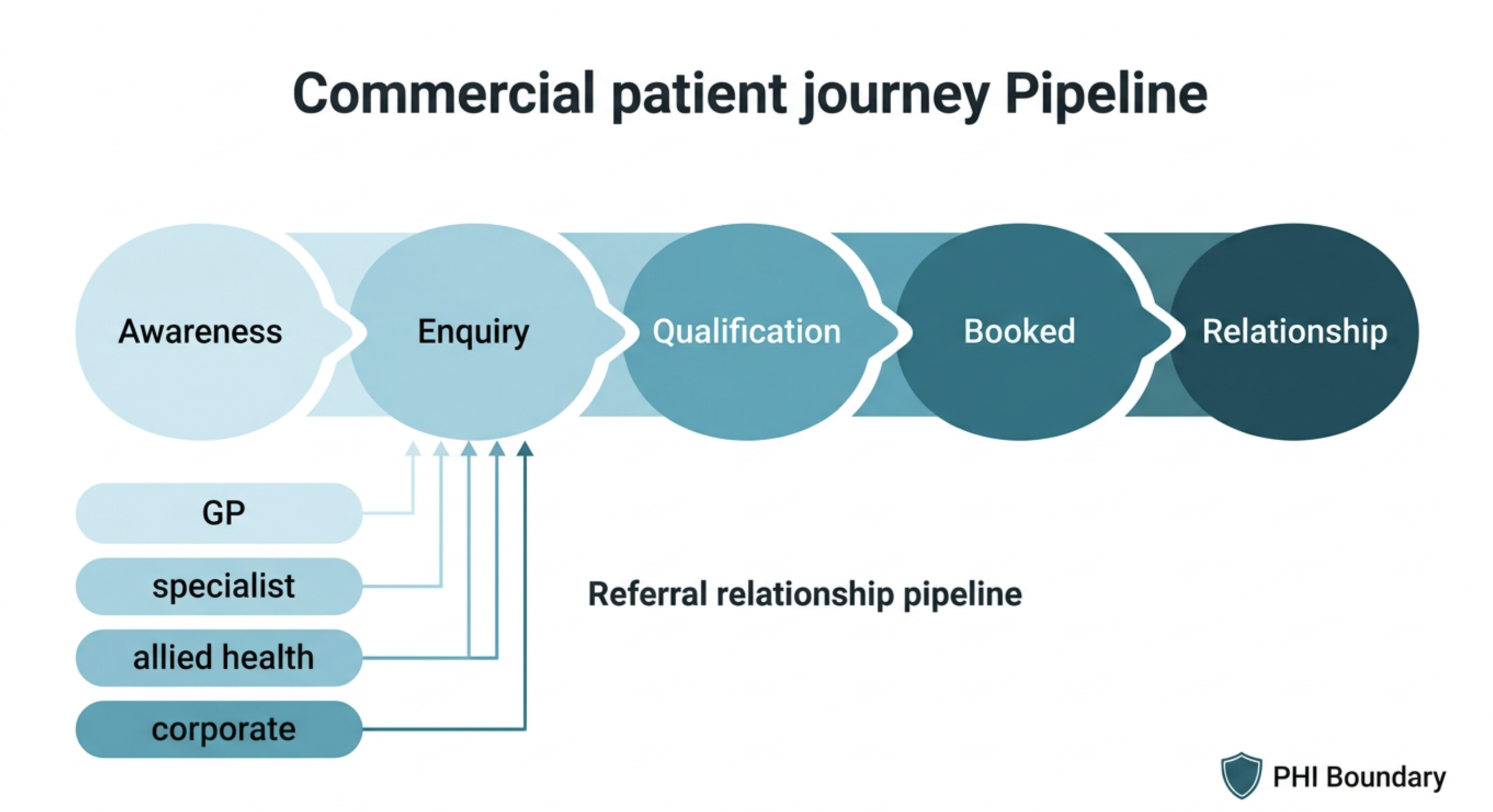
The five-stage commercial patient journey in HubSpot
The commercial patient journey — the portion that belongs in HubSpot rather than in clinical systems — has five distinct stages. Each requires different data, different workflows, and different success metrics.
Building the referral pipeline: the highest-value acquisition channel
For most private medical practices and specialist clinics, referrals from GPs, specialists, and allied health professionals are the primary source of new patients — and by significant margin the highest-converting channel. A referred patient arrives with established trust in the specialist's capability, lower decision-making friction, and often a higher urgency that translates directly to faster conversion.
And yet, in most practices, the referral pipeline exists only in the minds of the specialists and their administrators. Which GPs are referring consistently? Which referred fewer patients last quarter than the quarter before? Which allied health professionals have never referred but have been on the mailing list for two years? None of these questions can be answered without a structured referral pipeline in HubSpot.
The referral pipeline is not a patient pipeline — it is a relationship pipeline. The "deals" being tracked are not individual patients but the relationships with the referring clinicians and organisations that produce patients consistently over time. Managing this pipeline with the same discipline applied to a B2B sales pipeline — regular contact cadence, relationship health scoring, conversion tracking — is what separates practices that grow predictably from those that grow by chance.
Referral source segmentation and relationship management
Not all referral sources are equivalent. A GP practice that refers twelve patients per year deserves different investment than one that has referred two in three years. HubSpot's Company and Contact objects — combined with a structured referral tracking custom object — provide the data infrastructure to segment referral sources by volume, value, and relationship health, and to manage each segment with the appropriate level of attention.
The referral follow-up workflow architecture
When a referral is received — whether by letter, phone, or secure messaging — the response speed and quality of the acknowledgement significantly influences the referring clinician's likelihood of referring again. A practice that acknowledges every referral promptly, keeps the referring clinician informed of the patient's journey (appropriately and within consent boundaries), and thanks them for the relationship is one that earns continued referral loyalty. Most practices do none of these things systematically.
Enquiry-to-appointment conversion: where most practices lose patients
Between the moment a prospective patient makes an enquiry and the moment they book an appointment, most practices lose between 30% and 60% of their pipeline — not because patients chose a competitor, but because the follow-up was too slow, too impersonal, or simply did not happen. This is the most operationally fixable revenue leak in a private healthcare business.
The three most common reasons enquiries do not convert to appointments:
- Response delay: an enquiry submitted on a Friday afternoon is not followed up until Monday morning. By then, the prospective patient has contacted two other practices and booked with the one that called back Friday.
- Single-attempt follow-up: one call attempt, no answer, no further contact. The patient is not in a CRM with an automated follow-up sequence — they are in a mental queue that is forgotten by the end of the day.
- No objection handling: the patient expressed cost concern or uncertainty and the administrator did not have the information or authority to address it. No follow-up was structured to provide the information that might have resolved the concern.
A structured HubSpot enquiry follow-up workflow — acknowledgement within 30 minutes, three contact attempts over five days, objection-specific email sequences — consistently increases enquiry-to-appointment conversion rates by 20–40% in practices that implement it. The improvement is not from better marketing. It is from systematically closing the follow-up gap that was already present in the existing enquiry volume.
HubSpot properties for patient journey tracking
The minimum viable property set for commercial patient journey tracking in HubSpot — all non-PHI, all appropriate for storage in the CRM without a BAA in most configurations:
Source Type (dropdown: GP referral / specialist referral / self-referral / digital / event / corporate)
Enquiry Type (dropdown: new patient / returning enquiry / information only)
Service Area of Interest (dropdown: general categories only — not clinical specifics)
Enquiry Date (date — auto-populated on form submission or manual entry)
Days to First Response (calculated: first activity date − enquiry date)
Appointment Booked (checkbox)
Appointment Booked Date (date — populated manually by coordinator)
Days from Enquiry to Booking (calculated)
Attended (checkbox — de-identified status only)
NPS Score (number — from satisfaction survey)
Referrals Generated (number — updated when this patient refers others)
Contact properties (referral source — clinician):
Referral Source Tier (dropdown: Tier 1 / 2 / 3 / 4)
Annual Referral Count (number — auto-incremented by workflow)
Last Referral Date (date — auto-updated)
Relationship Manager (HubSpot user)
Last Contact Date (date)
Specialty (dropdown)
Custom object: Referral Record
Referral Date (date)
Service Area (dropdown — general only)
Referral Status (dropdown: received / acknowledged / patient contacted / converted / not converted)
Associated Referring Contact (lookup)
Associated Referring Company — practice (lookup)
Measuring commercial performance in a healthcare CRM
The commercial KPIs that a well-configured healthcare HubSpot portal should answer automatically — without manual report building every month:
These six KPIs, available from a well-configured HubSpot portal, replace the monthly spreadsheet exercise most practice managers currently conduct to produce the same information — incompletely, inconsistently, and hours later than necessary. The dashboard that surfaces them automatically is not a luxury. It is the operational infrastructure that allows a practice to manage its commercial performance the same way a well-run business manages any other function: with current data, not memory.