

Most ecommerce brands connect their store to HubSpot and call it an integration. It is not. A native connector that syncs contacts and order history into HubSpot is a data pipe. A RevOps data model is a deliberate architecture that makes that data useful for segmentation, automation, attribution, and LTV growth — and the difference in commercial outcome between the two is significant.
- Why native ecommerce integrations underdeliver
- Choosing your integration approach: native, middleware, or custom API
- The ecommerce data model: four objects that make HubSpot useful
- Contact enrichment from order data
- Customer segmentation architecture in HubSpot
- The abandoned cart workflow — built correctly
- Post-purchase lifecycle and LTV growth
- Attribution: connecting marketing spend to order revenue
Why native ecommerce integrations underdeliver
HubSpot's native Shopify integration and the most common WooCommerce connectors do one thing well: they sync contact and order data into HubSpot. Contact records are created or updated when a customer places an order. Deal or order records appear in HubSpot linked to the contact. Product information is available in the deal record.
For most ecommerce teams, this is where the integration work stops — and where the commercial value stops with it. The data is in HubSpot, but it is not structured in a way that enables the questions ecommerce RevOps teams actually need to answer: who are our highest-LTV customers and what did they look like before they became high-LTV? Which acquisition channels produce customers who repurchase? What is the optimal intervention point to convert a one-time buyer into a repeat purchaser?
Answering these questions requires more than a data sync. It requires a deliberate data model — a set of objects, properties, and associations designed around ecommerce commercial logic rather than HubSpot's default structure.
The most expensive ecommerce HubSpot mistake: spending significant budget on a custom integration that moves order data into HubSpot in real time, then discovering the data is not structured in a way that enables segmentation or automation. Integration without data modeling produces a CRM full of unusable data — accurate, comprehensive, and commercially inert.
Choosing your integration approach: native, middleware, or custom API
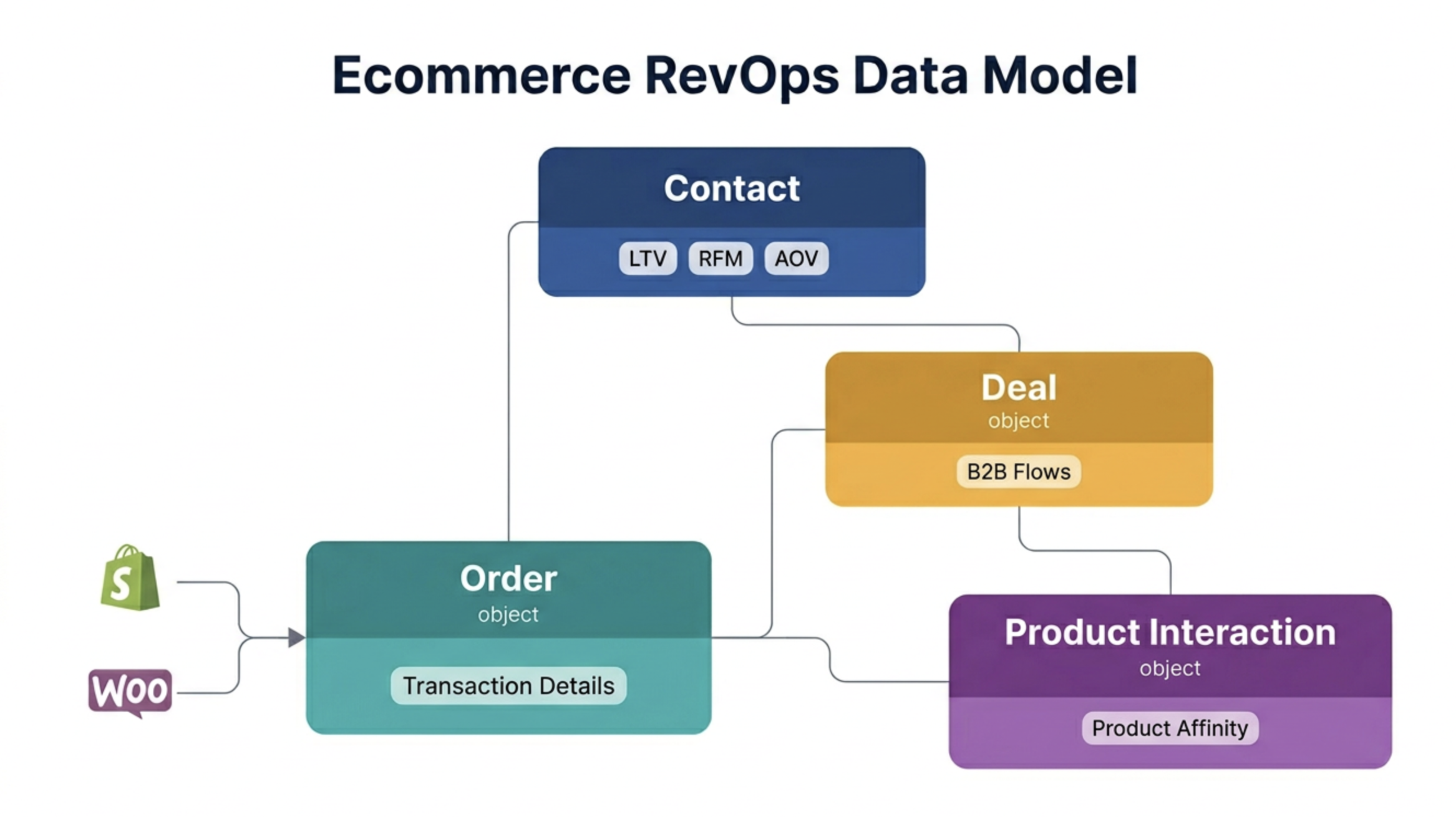
The ecommerce data model: four objects that make HubSpot useful
A purpose-built ecommerce data model in HubSpot uses four objects in combination. The native Contact and Deal objects handle most use cases. Two custom objects — Order and Product Interaction — extend the model for ecommerce-specific analytics.
→For the full custom object design framework and association architecture, see Article: HubSpot custom objects & associations — advanced data modeling for complex businesses.
Contact enrichment from order data
The most valuable transformation a RevOps data model delivers for ecommerce is the enrichment of the Contact record with aggregated purchase intelligence. A contact record that shows only "email address" and "last order date" supports basic email marketing. A contact record that shows RFM segment, LTV tier, category affinity, and repurchase probability supports a fundamentally different level of personalisation and automation.
The contact properties that must be calculated and maintained from order data:
Total Orders (number — count of Order objects associated to Contact)
Total Revenue (currency — sum of Order values)
Average Order Value (currency — calculated: Total Revenue ÷ Total Orders)
First Order Date (date — earliest Order date)
Last Order Date (date — most recent Order date)
Days Since Last Order (number — calculated: today − Last Order Date)
Preferred Category (dropdown — most frequent category across all Orders)
Discount Rate (% — average discount applied across Orders)
Return Rate (% — Orders with returns ÷ Total Orders)
LTV Tier (dropdown: Bronze / Silver / Gold / VIP — see Section 5)
RFM Segment (dropdown — see Section 5)
Repurchase Probability Score (number 0–100 — see Section 7)
These properties must be recalculated whenever a new Order is created or updated. In HubSpot, this is achieved using Operations Hub custom coded workflow actions — the calculation logic runs server-side, writes the result to the Contact property, and triggers downstream segmentation and automation updates. Without this recalculation logic, the properties become stale within days of going live and lose their commercial value entirely.
Customer segmentation architecture in HubSpot
Ecommerce customer segmentation in HubSpot should be built on two complementary frameworks: LTV tiers for investment-level decisions, and RFM scoring for engagement timing decisions. Together they answer the two most important segmentation questions: how much is this customer worth, and when should we reach out to them?
LTV tier segmentation
RFM scoring in HubSpot
RFM (Recency, Frequency, Monetary) scoring assigns each customer a composite score across three dimensions. In HubSpot, this is calculated via an Operations Hub custom coded action that runs on a defined schedule — typically nightly — and writes the RFM segment label to the Contact record. The RFM segment then becomes the trigger for targeted automation sequences.
The abandoned cart workflow — built correctly
Abandoned cart is the most commonly built ecommerce automation in HubSpot. It is also the most commonly built incorrectly. The most common failures: sending the cart abandonment email too quickly (within minutes, before the customer has simply tabbed away temporarily), sending only one email rather than a sequence, and failing to suppress customers who have already purchased through a different session.
The correct abandoned cart workflow architecture:
Post-purchase lifecycle and LTV growth
The highest-ROI ecommerce automation is not abandoned cart recovery. It is the post-purchase lifecycle sequence — the systematic effort to convert a one-time buyer into a repeat purchaser and a repeat purchaser into a loyal, high-LTV customer.
The post-purchase lifecycle in HubSpot operates in three phases:
- Phase 1 — First purchase (days 1–14): order confirmation, shipping notification (from ecommerce platform, not HubSpot), delivery confirmation acknowledgement, satisfaction survey trigger after delivery confirmed. Goal: establish trust in fulfilment quality and brand experience.
- Phase 2 — Repurchase window (days 15–60): product education content relevant to the purchased category, complementary product recommendations based on category affinity data, re-engagement trigger at the customer's predicted repurchase point (calculated from average category repurchase frequency). Goal: first repurchase — the single most impactful LTV conversion event.
- Phase 3 — Loyalty (day 61+, 2+ orders): LTV tier upgrade communication, loyalty programme enrolment, early access to new products, referral programme invitation. Goal: move the customer from transactional to relational — where LTV compounds rather than accumulates linearly.
The data from Blog research on ecommerce consistently shows that customers who make a second purchase within 60 days of their first have a 5x higher predicted LTV than customers who take 90+ days to repurchase. The post-purchase repurchase window automation — timed around each customer's predicted repurchase point based on category data — is the single highest-leverage LTV investment an ecommerce brand can make in HubSpot.
Attribution: connecting marketing spend to order revenue
Ecommerce attribution in HubSpot has one advantage over B2B attribution: the conversion event is unambiguous — an order was placed, at a specific value, at a specific time. The challenge is connecting that order back to the acquisition touchpoints that brought the customer to the store.
The attribution model that works best for ecommerce in HubSpot:
| Channel type | Recommended model | Configuration in HubSpot |
|---|---|---|
| Paid search (Google, Bing) | Last-touch | UTM parameters on all paid URLs → captured in HubSpot Original Source detail. First purchase attributed to last paid click before conversion. |
| Paid social (Meta, TikTok, Pinterest) | Time-decay | UTM parameters + Meta CAPI integration for post-iOS privacy changes. Time-decay model reflects the consideration window typical of social commerce. |
| Email marketing | Last-touch within session | HubSpot email click tracking + UTM. Email attributed only when the click directly precedes the purchase session — not for email clicks followed by 7-day consideration periods. |
| Organic search / SEO | First-touch | First-touch model for organic: credits the content that first brought a customer to the site, reflecting the brand-building nature of SEO investment. |
| Referral / affiliate | Source-based (custom) | Referral source property populated via referral code or affiliate UTM. Attribution model is source-based rather than touchpoint-based — the referral partner gets full credit regardless of touchpoint sequence. |
No single attribution model is correct for ecommerce. The practical approach is to run last-touch attribution as the primary model for paid channel budget decisions — it is the most actionable for optimising ad spend — while maintaining a first-touch view for brand and content investment decisions. The gap between what each model shows for a given channel is the measure of how much mid-funnel influence that channel has — information that neither model alone would surface.
→For the full breakdown of all six HubSpot attribution models and how to select between them for different GTM motions, see Article: Revenue attribution models in HubSpot — first-touch, multi-touch & beyond.