Most Salesforce implementations are built to solve an immediate problem: get the sales team logging activity, get the pipeline visible to leadership, get marketing sending emails. They succeed at that immediate problem. Three years later, the organisation has outgrown the architecture that solved it, and the cost of rebuilding on a live system used by hundreds of people is the price of not designing for scale at the start.
- Why Salesforce architecture decisions compound over time
- The four architectural principles of a scalable Salesforce RevOps build
- The core object model: what belongs in Salesforce and what does not
- The four layers of a scalable Salesforce architecture
- Revenue Cloud readiness: designing for it before you need it
- The customisation ceiling: where native configuration ends and Apex begins
- Org strategy: single org vs multi-org for growing organisations
- The architecture review: questions to ask before building anything
Why Salesforce architecture decisions compound over time
Salesforce is the most customisable CRM platform available to enterprise organisations. That is its greatest strength and its most significant risk. Every customisation decision made in year one is a constraint on what can be built in year three. A custom field added without a naming convention becomes the first entry in a library of inconsistently named fields that will take a dedicated admin weeks to audit. A workflow rule built before Flow was fully adopted becomes one of forty legacy automations that conflict with new processes in ways that surface only when a critical deal fails to route correctly.
The organisations that get the most value from Salesforce over a five to ten year horizon are not the ones that implemented it most quickly. They are the ones that designed the architecture before building it, documented every decision made during the build, and governed the system with the same rigour after go-live that they applied during implementation.
Scalable Salesforce architecture is not a feature of any particular plan tier or product. It is a set of design decisions applied consistently from the first configuration session. Those decisions are the subject of this blog.
The single most expensive Salesforce architectural mistake made by growing organisations: building the implementation around the current sales process rather than the revenue model the business is scaling toward. A 20-person sales team and a 200-person sales team need fundamentally different permission architectures, automation designs, and reporting infrastructures. Building for the current state and rebuilding for the future state costs significantly more in total than designing for the future state from the beginning.
The four architectural principles of a scalable Salesforce RevOps build
The core object model: what belongs in Salesforce and what does not
The foundational question of any Salesforce RevOps architecture is which data belongs in Salesforce and which belongs in connected systems. Salesforce is a relationship and transaction platform. It excels at managing the connections between entities, tracking the status of commercial relationships, and recording the activities that advance those relationships toward revenue. It is not a data warehouse, a product database, a financial ledger, or a content management system. Treating it as any of these creates the data model sprawl that makes large Salesforce orgs expensive to maintain.
The core object model for a scalable B2B Salesforce RevOps implementation:
Account: the commercial entity. Parent of all revenue relationships.
Key fields: Account Type, Industry, Annual Revenue, Owner, Territory.
Relationship: parent to Contact, Opportunity, Contract, Case.
Contact: the individual at the Account. Role-based, not activity-based.
Key fields: Title, Department, Contact Role, Relationship Strength.
Relationship: many-to-many with Opportunity via OpportunityContactRole.
Opportunity: the specific revenue event being pursued.
Key fields: Stage, Amount, Close Date, Forecast Category, Lead Source.
Relationship: child of Account, linked to Contact via role junction.
Lead: the pre-qualification record. Converted to Account/Contact/Opportunity
at the point of sales acceptance. Not a long-term record type.
Key fields: Lead Source, Lead Status, Converted (boolean), Rating.
Campaign: the marketing touchpoint tracker. The attribution anchor.
Key fields: Campaign Type, Start/End Date, Budgeted Cost, ROI.
Relationship: linked to Lead and Contact via CampaignMember junction.
Contract: the commercial agreement following closed-won Opportunity.
Key fields: Contract Start/End Date, Status, Billing Terms.
Relationship: child of Account, parent of Subscription or Order.
Case: the service record. Linked to Account and Contact.
Key fields: Case Origin, Priority, Status, Resolution Time.
The Lead-to-Contact conversion model is the most consequential architectural decision in a B2B Salesforce implementation. Two schools of thought exist: convert Leads immediately upon qualification and work exclusively with Account-Contact-Opportunity objects, or maintain Leads through an extended nurture period before conversion. The correct answer depends on the sales motion. High-velocity inside sales benefits from early conversion. Long-cycle enterprise sales with extended MQL-to-SAL periods may justify maintaining Leads longer. This decision must be made explicitly and documented before the first lead enters the system, because changing the conversion model after go-live requires migrating historical data and rebuilding attribution.
The four layers of a scalable Salesforce architecture
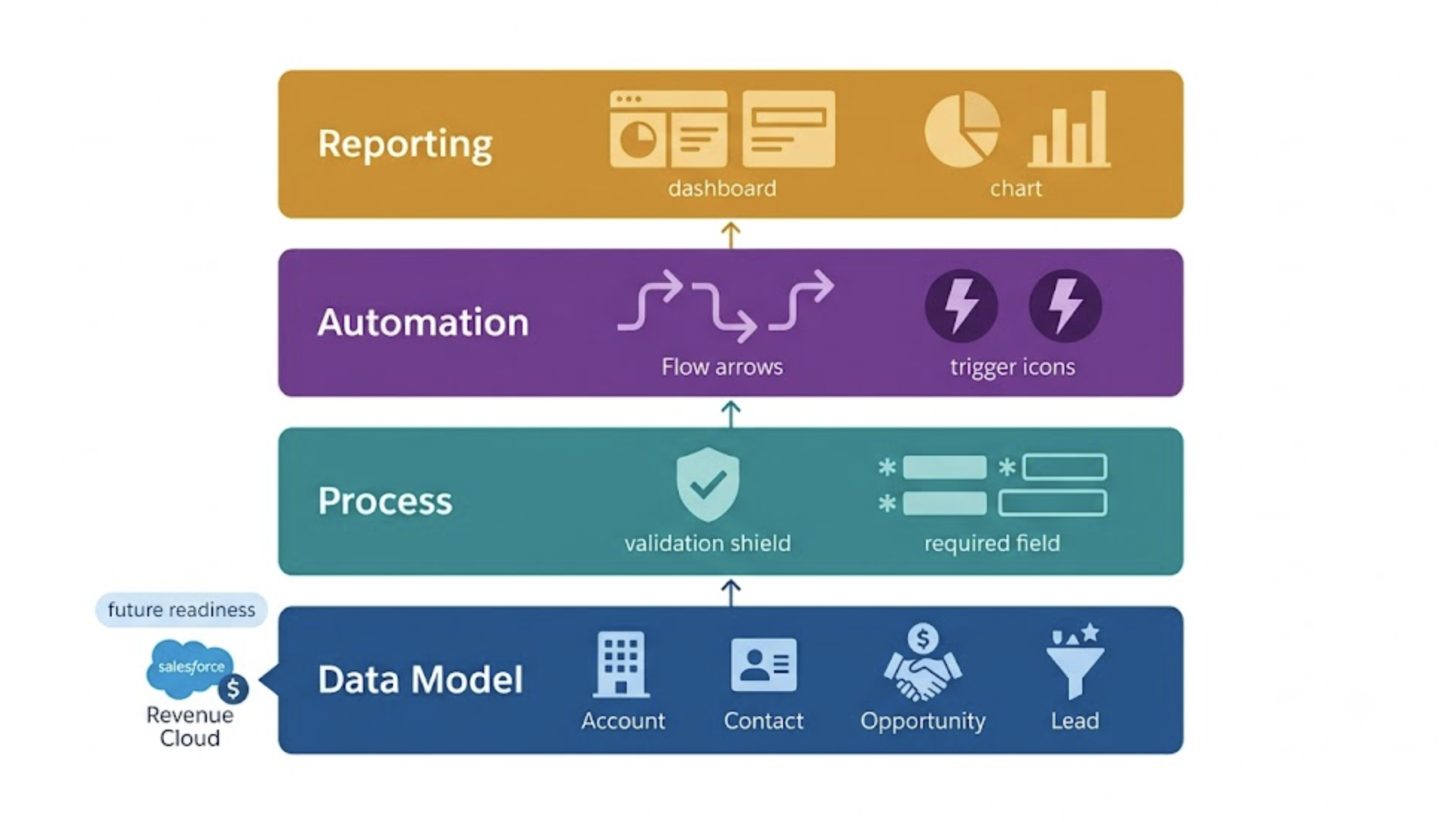
A scalable Salesforce RevOps architecture is built in four layers, each dependent on the one below it. Building in the wrong sequence is the most common cause of implementation rework.
Data Model
Process
Automation
Reporting
Revenue Cloud readiness: designing for it before you need it
Salesforce Revenue Cloud connects CPQ (Configure, Price, Quote), Billing, and Subscription Management into a unified quote-to-revenue lifecycle. For organisations that expect to implement Revenue Cloud within a three to five year horizon, the foundational architecture decisions made during the initial Sales Cloud build either accelerate or obstruct that future implementation.
The architectural decisions that determine Revenue Cloud readiness:
- Product catalogue design: Revenue Cloud's CPQ engine depends on a structured Salesforce Product and Price Book architecture. Organisations that store product information in custom fields on Opportunity line items rather than in the standard Products object will need to migrate that data before CPQ can be configured. Design the Product object correctly from the start.
- Contract and Order object usage: Revenue Cloud's Billing module extends the standard Contract and Order objects. Organisations that repurpose these objects for non-standard use cases, or that ignore them in favour of custom objects, will need significant rework before Revenue Cloud can be activated.
- Opportunity stage alignment with CPQ stages: Revenue Cloud's quote lifecycle maps to specific Opportunity stages. An Opportunity stage model designed without awareness of this mapping will require restructuring when CPQ is implemented. Align stage names and probability values with Salesforce's CPQ-compatible conventions from the initial configuration.
Revenue Cloud readiness is not about implementing Revenue Cloud features prematurely. It is about making foundational architecture decisions that leave the door open for Revenue Cloud rather than closing it. An organisation that correctly structures its Product catalogue, uses the Contract object as intended, and designs its Opportunity stage model with CPQ awareness will spend a fraction of the implementation cost when Revenue Cloud adoption becomes necessary compared to one that has to restructure three years of accumulated data and customisation.
The customisation ceiling: where native configuration ends and Apex begins
Salesforce's declarative toolset, Flow Builder, validation rules, formula fields, and approval processes, covers the majority of RevOps automation and process requirements without writing a single line of code. Understanding where this native capability reaches its ceiling, and what the cost of crossing into Apex development means for long-term maintainability, is a prerequisite for every architectural decision.
| Requirement | Native capability | When Apex is justified |
|---|---|---|
| Record-triggered automation | Flow Builder handles the majority of record-triggered logic including complex branching, subflows, and callouts to external systems | Apex is justified when Flow execution time limits are reached in high-volume orgs or when the logic requires direct database manipulation not expressible in Flow |
| Complex calculations | Formula fields handle multi-step calculations across related objects. Flow can write calculation results to fields on trigger | Apex is justified when calculations involve aggregations across large related record sets that formula fields cannot traverse or that cause Flow CPU time limit errors |
| Integration with external systems | Flow can make HTTP callouts to external APIs. Operations can be chained with error handling in the same Flow | Apex is justified when integration requires complex response parsing, retry logic, bulk processing of API responses, or guaranteed delivery that Flow's error handling cannot provide |
| Bulk data operations | Batch data import via Data Loader or Flow bulk processing covers most scheduled data operations | Apex Batch classes are justified when processing millions of records on a defined schedule with complex per-record logic that cannot be expressed in Flow |
| Custom UI components | Lightning App Builder, dynamic forms, and standard components cover the majority of user interface requirements | Lightning Web Components in Apex are justified when a business requirement genuinely cannot be met with standard components and the maintenance cost is understood and owned |
The architectural principle that prevents the most common Salesforce technical debt pattern: every Apex class written must be owned. Not owned by the implementation partner who wrote it and has since moved on. Owned by a named internal resource who understands it, can modify it, and is accountable for its behaviour when Salesforce releases a platform update that changes the underlying API. Apex without internal ownership is a liability disguised as a feature.
Org strategy: single org vs multi-org for growing organisations
The decision between a single Salesforce org and a multi-org architecture is one of the most consequential and least frequently discussed architectural choices in enterprise Salesforce deployments. Most growing organisations default to a single org without explicitly evaluating the alternative. By the time the limitations of that decision are apparent, reversing it requires a major migration project.
The criteria that favour a single org architecture:
- The organisation operates as a single commercial entity with shared pipeline, shared reporting, and shared revenue accountability
- Sales, Marketing, and Service teams need to share contact and account records without data residency or regulatory restrictions between them
- Consolidated cross-functional reporting is a primary requirement and the overhead of cross-org data federation is not justified
The criteria that favour a multi-org architecture:
- Distinct business units operate with separate sales motions, separate data governance requirements, or separate regulatory environments that make shared data inappropriate
- Acquired entities need to be onboarded without disrupting the existing org's data model and automation
- Geographic regions operate under data residency requirements that prevent sharing records across a single global org
The architecture review: questions to ask before building anything
Before any Salesforce RevOps implementation begins, the following questions must be answered in writing. Not in a kick-off call. In a written architecture brief that the implementation team and the internal RevOps stakeholders both review and sign off. These questions are the diagnostic that separates a scalable architecture from one that will require rework.
The organisations that build the most effective Salesforce RevOps architectures share one characteristic: they treat the architecture review as the most important phase of the implementation, not the preliminary phase before the important work begins. Every hour invested in answering these six questions before configuration starts saves at least ten hours of rework after go-live. The architecture is the implementation. Everything else is execution.