
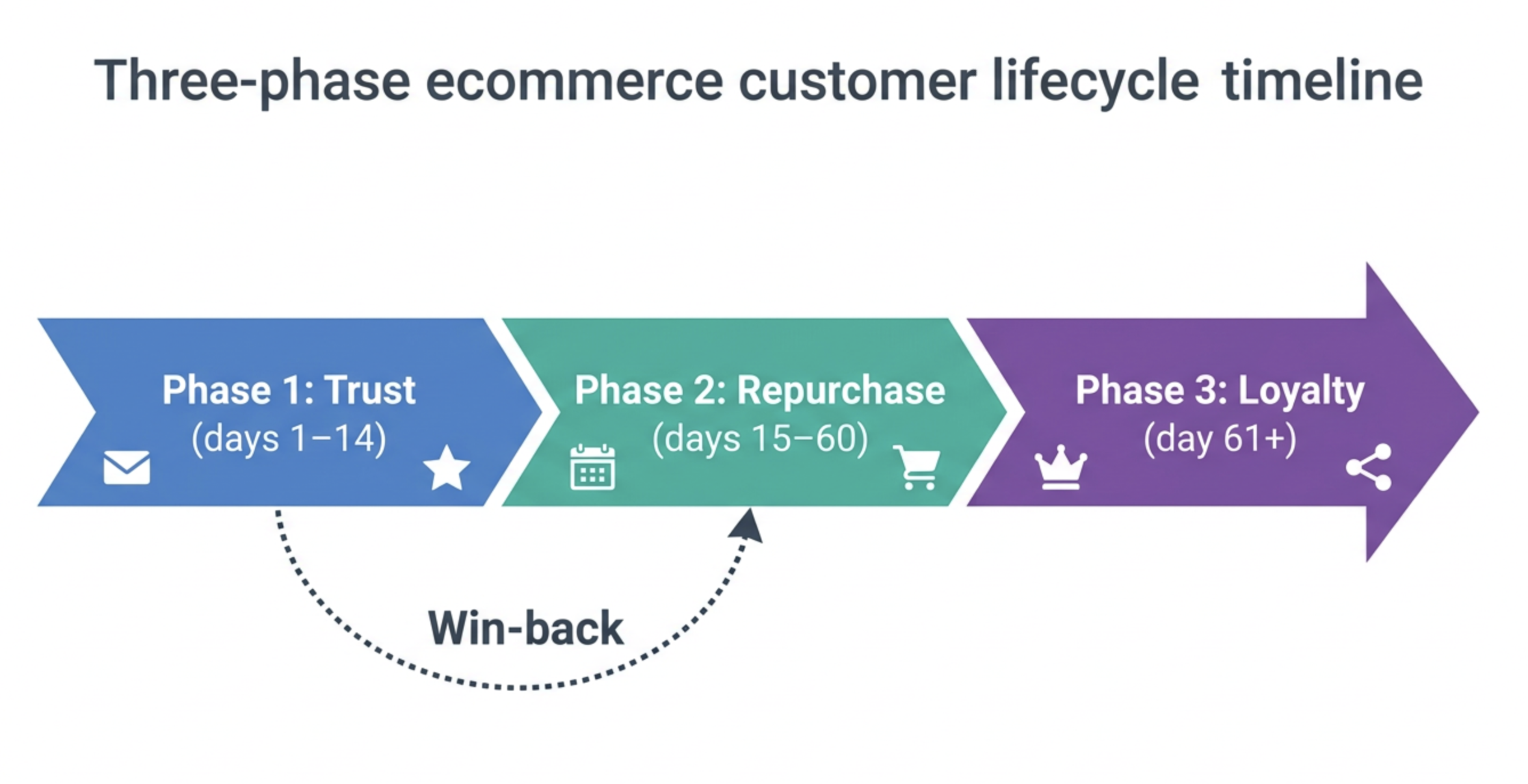
Ecommerce brands spend the majority of their marketing budget acquiring customers and a fraction of it retaining them. The economics of this allocation are backwards. A customer who has already purchased from you is five times cheaper to sell to than a new one — and the compounding effect of systematic retention automation on LTV is larger than almost any acquisition investment you can make at equivalent cost.
- The LTV economics case for post-purchase automation
- The three-phase post-purchase lifecycle model
- Phase 1 — Trust building: the first 14 days
- Phase 2 — Repurchase trigger: the 15–60 day window
- Phase 3 — Loyalty acceleration: day 61 and beyond
- Win-back workflows for lapsed customers
- Personalisation at scale: using order data to drive relevance
- Measuring LTV growth from automation in HubSpot
The LTV economics case for post-purchase automation
Most ecommerce brands measure marketing performance in terms of ROAS — return on ad spend for acquisition campaigns. It is the dominant metric because it is easy to calculate, easy to compare across channels, and easy to present to leadership. It is also a deeply incomplete picture of revenue performance.
ROAS measures the value of a customer's first order against the cost of acquiring them. It says nothing about what that customer does after the first order — whether they buy again, how frequently, at what average order value, and over how long a customer lifetime. A brand with a 4x ROAS and a 15% repeat purchase rate is generating far less revenue per acquired customer than a brand with a 3x ROAS and a 45% repeat purchase rate. The second brand is systematically building LTV. The first is running an expensive acquisition treadmill.
Post-purchase automation in HubSpot is the systematic infrastructure for moving customers from their first order to their second, third, and beyond — at scale, with minimal marginal cost per customer interaction. The brands that build this infrastructure correctly compound their LTV while their competitors keep running the acquisition treadmill.
The unit economics benchmark worth knowing: in most ecommerce categories, a customer who makes three purchases has a predicted LTV that is 4–5x the LTV of a customer who makes one purchase. The second purchase is the threshold that changes everything — not because it contributes significantly to revenue directly, but because it establishes a purchasing relationship that makes the third, fourth, and fifth purchases far more likely. Every post-purchase automation investment should be evaluated against this threshold.
The three-phase post-purchase lifecycle model
Post-purchase automation is not a single workflow. It is a lifecycle model with three distinct phases — each with a different objective, a different set of triggers, and a different measure of success. Building all three in sequence, and connecting them through shared Contact properties and LTV tier logic, is what separates a post-purchase automation system from a series of disconnected email sequences.
Phase 1 — Trust building: the first 14 days
The first fourteen days after a purchase are the period of highest customer anxiety and highest brand vulnerability. The customer is waiting for their order, evaluating whether the product matches expectations, and forming the brand relationship they will carry into future purchase decisions. The brands that get this phase right see significantly lower return rates and higher satisfaction scores — which are the leading indicators of repeat purchase behaviour.
Phase 2 — Repurchase trigger: the 15–60 day window
The repurchase trigger phase is the most commercially significant phase of the post-purchase lifecycle and the one most brands handle worst. The most common failure is sending a generic "we miss you" email at day 30 to every customer regardless of what they bought, when they typically repurchase in that category, or whether they have already repurchased through a different session.
The correct approach uses three inputs to calibrate repurchase timing:
- Category repurchase frequency: skincare repurchases in 30–45 days. Homeware repurchases in 60–90 days. Apparel repurchases in 45–75 days. These are category averages — your Order data will show your specific patterns. Use Operations Hub to calculate the median days-to-repurchase per category from your historical order data and write it to a Category Repurchase Window property.
- Customer LTV tier: VIP and Gold customers need less aggressive outreach — they are more likely to repurchase without prompting. Bronze and one-time buyers need a stronger incentive structure. The timing and offer in the repurchase sequence should differ by LTV tier.
- Suppression check: before every email in this phase, verify that no new Order has been created since the sequence began. Customers who repurchase on their own should exit the sequence immediately — continued outreach after a purchase is friction, not marketing.
The single most impactful configuration detail in the repurchase trigger phase: timing the outreach to arrive approximately 5 days before the customer's predicted repurchase point — not at the point itself, not after it. Arriving 5 days early captures the customer when they are beginning to consider reordering. Arriving at the exact repurchase point means competing with the moment they are already acting. Arriving after it means reaching a customer who has either already repurchased or already lapsed.
Repurchase sequence structure by LTV tier
Phase 3 — Loyalty acceleration: day 61 and beyond
Customers who have made two or more purchases within the post-purchase lifecycle window have demonstrated something valuable: a willingness to repurchase that not every customer shows. Phase 3 is the system for converting these repeat purchasers into high-LTV loyal customers — by deepening the relationship, expanding the product categories they engage with, and activating their referral potential.
The Phase 3 automation tracks three escalation events:
| Event | Trigger in HubSpot | Automation response |
|---|---|---|
| Second purchase confirmed | Total Orders property reaches 2 | LTV tier recalculated. Welcome to "repeat customer" email with loyalty programme invitation if applicable. Category expansion recommendation based on first two order categories. Referral programme introduction — "share with a friend" at this stage has the highest conversion rate in the customer lifecycle. |
| LTV tier advancement | LTV Tier property changes (e.g. Bronze → Silver) | Tier upgrade acknowledgement email — treat the upgrade as an event worth celebrating. Unlocks tier-specific benefits if a loyalty programme is in place. Updates email personalisation tokens to reflect new tier status in all subsequent communications. |
| Category expansion purchase | New product category appears in Preferred Category or Order data | Category expert email sequence — deeper content and recommendations for the new category. Cross-category bundle recommendations. This customer is expanding their product relationship with the brand — reward and reinforce that behaviour. |
Win-back workflows for lapsed customers
A lapsed customer — one who has not purchased in 90+ days after previously buying — is not a lost customer. They are a customer whose relationship has gone quiet. Win-back automation is the systematic effort to re-activate that relationship before the customer becomes permanently inactive — a state that is far more expensive to reverse than to prevent.
Personalisation at scale: using order data to drive relevance
The difference between ecommerce automation that converts and automation that becomes noise is personalisation — content that reflects what the individual customer has bought, what they are likely to want next, and where they are in their relationship with the brand. In HubSpot, this personalisation is driven by the Contact properties populated from Order data in Blog 17's data model.
The five personalisation dimensions that drive the highest engagement lift in ecommerce automation:
Trigger: all repurchase and win-back emails reference the customer's
Preferred Category property — the most frequently purchased category.
Implementation: HubSpot personalisation token in email subject line and body.
2. LTV tier messaging tone
VIP contacts receive a different communication style — more exclusive,
more personal, less promotional — than Bronze contacts who receive
more benefit-led, incentive-heavy messaging.
Implementation: smart content blocks in HubSpot email templates,
switching content based on LTV Tier property value.
3. Repurchase timing calibration
Email send time adjusted per Category Repurchase Window property.
Not a fixed 30-day delay — a dynamic delay based on each customer's
category-specific predicted repurchase point.
Implementation: Operations Hub calculated property used as
workflow delay trigger.
4. Order count milestone acknowledgement
Emails sent at order count milestones (2nd order, 5th order, 10th order)
feel personal even when automated — they mark the customer's
relationship with the brand as something the brand has noticed.
Implementation: workflow trigger on Total Orders property value change.
5. Product affinity cross-sell
Cross-sell recommendations based on which products customers with
similar purchase histories bought next — not generic best-sellers.
Implementation: Product Interaction object data → Operations Hub
recommendation logic → personalisation token in email body.
Measuring LTV growth from automation in HubSpot
Post-purchase automation is an investment. Like any investment, it must be measured against a clear return — not vanity metrics like email open rates, but commercial metrics that reflect actual LTV movement.
The measurement approach that matters most: cohort analysis. Take all customers who made their first purchase in a given month, track their repeat purchase behaviour over the following six months, and compare cohorts before and after post-purchase automation was implemented. This shows the aggregate LTV impact of the automation investment more clearly than any individual campaign metric — and it is the number that justifies continued investment in the system.