

A CRM migration is not a technical project with a human element. It is an organisational change with a technical component. The teams that understand this distinction complete migrations on time, with clean data, and with a sales team that trusts the new system. The teams that treat it as a data import project discover the distinction the hard way — six months after go-live, when adoption is at 40% and the old system is still being used in parallel.
- Why CRM migrations fail — the honest assessment
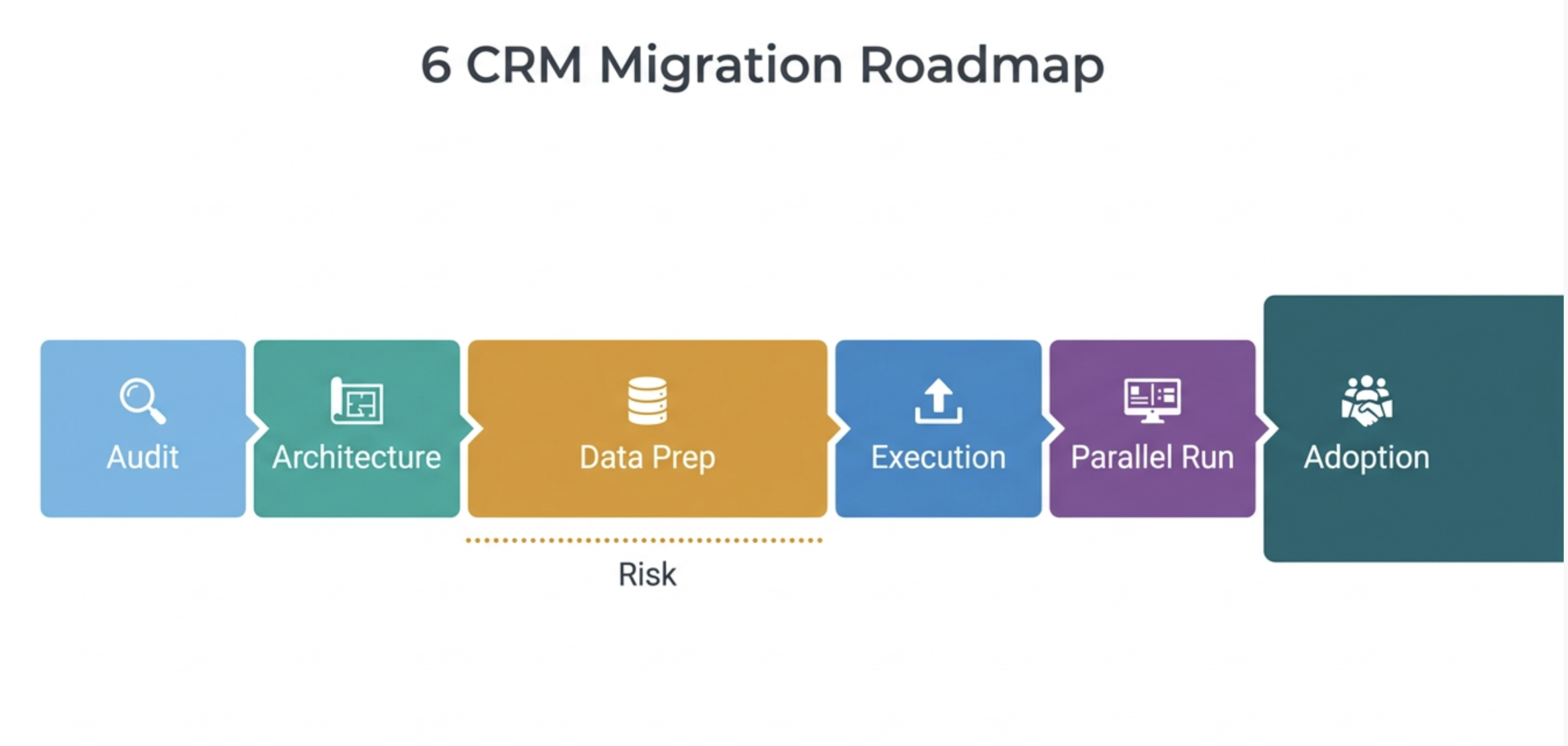
- The six phases of a successful migration
- Phase 1: audit and decision — should you migrate at all?
- Phase 2: data architecture — building HubSpot before moving data
- Phase 3: data preparation — the work nobody wants to do
- Phase 4: migration execution — the technical checklist
- Phase 5: parallel run — validating before decommissioning
- Phase 6: adoption and governance — the work that determines success
Why CRM migrations fail — the honest assessment
CRM migrations fail more often than they succeed on their original timeline and budget. The reasons are predictable and consistent across organisations of all sizes. Understanding them before starting is more valuable than any technical checklist.
The three root causes of migration failure, in order of frequency:
- Data quality underestimation. The legacy CRM contains years of inconsistent data — duplicate contacts, incomplete records, properties used in ways they were not designed for, and historical data that was accurate when entered and has since been invalidated. Teams consistently underestimate how much remediation is required before data is suitable for migration. The discovery of the actual data quality state typically happens mid-migration, causing scope and timeline expansion that was entirely preventable with a proper pre-migration audit.
- HubSpot built after data moved. The single most common technical failure: migrating data into a HubSpot portal whose architecture was not finalised before the migration began. Data arrives in HubSpot and immediately requires remapping, because the property structure that made sense in the legacy CRM does not map cleanly to the HubSpot data model that was designed independently of the migration plan. The migration and the HubSpot build must happen in sequence — build first, migrate second.
- Adoption treated as training, not change management. A sales team that was productive in the old system views a new CRM as a productivity threat, not a productivity improvement — regardless of how much better the new system objectively is. Training tells people how to use the system. Change management addresses why they should want to. Migrations that invest in training but not in change management achieve technical go-live and commercial stagnation simultaneously.
The migration timeline that every implementation partner gives and that is almost always wrong: three months from kickoff to go-live for a mid-market migration. The realistic timeline for a mid-market migration with proper data preparation, HubSpot build, parallel run, and adoption programme: five to seven months. Any estimate shorter than five months should be questioned specifically about what phases it excludes — because something is always excluded, and what is excluded is usually data preparation or adoption, the two phases that most determine whether the migration succeeds.
The six phases of a successful migration
Phase 1: audit and decision — should you migrate at all?
The first decision in any CRM migration is whether migration is the right approach. Not all data in a legacy CRM is worth migrating. Not all legacy CRM configurations can be reproduced in HubSpot without significant compromise. And sometimes, the organisation's RevOps maturity is not sufficient to support a migration without creating a worse situation than the one being left.
Phase 2: data architecture — building HubSpot before moving data
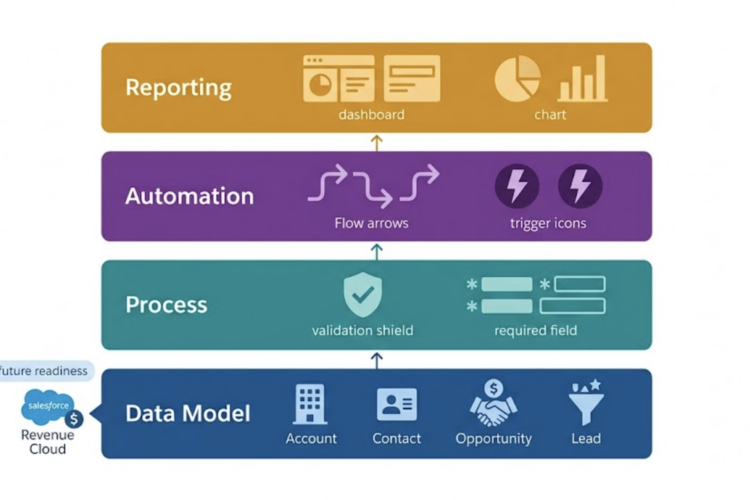
The cardinal rule of CRM migration: the destination must be fully built before a single record is imported. This means HubSpot's data model, property structure, pipelines, lifecycle stages, user roles, and integration architecture must be designed, configured, and tested against sample data before the full migration begins.
The data architecture decisions that must be finalised in Phase 2:
Phase 3: data preparation — the work nobody wants to do
Data preparation is the phase that determines migration quality more than any other — and the phase most commonly compressed under time pressure. It is also the phase where most migrations acquire the technical debt they spend the following year remediating.
The data preparation work that must happen before any record is imported into HubSpot:
| Preparation task | Description | Risk if skipped |
|---|---|---|
| Contact deduplication | Identify and merge duplicate contact records in the source system before export. Use email address as primary dedup key, supplemented by phone number and company domain for cases where email is inconsistent. | High Duplicate contacts imported into HubSpot immediately corrupt attribution, lifecycle, and routing workflows. |
| Company deduplication | Merge duplicate company records. Standardise company domain format. Resolve cases where the same company exists under multiple names, subsidiaries, or regional variations. | High Duplicate companies prevent accurate account-level reporting and create confusing contact association states. |
| Property standardisation | Normalise all property values to match HubSpot's expected formats: phone numbers to E.164, dates to ISO format, dropdown values to match HubSpot picklist options. | High Non-standard values either fail to import or import as free text, breaking segmentation and filtering. |
| Data completeness review | For every property identified as required in HubSpot's data model, measure completion rate in the source data. Rows with empty required fields will either fail to import or import with blank fields that break workflows. | Medium Incomplete required fields cause workflow failures and reduce data quality from day one. |
| Historical data triage | Decide which historical records to migrate (active in last 24 months), which to archive (inactive, export to CSV), and which to exclude (invalid records, test data, clearly outdated contacts). | Medium Importing all historical data indiscriminately inflates contact counts, increases HubSpot costs, and degrades reporting accuracy. |
| Activity and note audit | Decide which historical activities — calls, emails, meetings, notes — to migrate. Full activity history migration is expensive in time and often produces low-value data. Migrate the last 12–24 months of activities for active contacts only. | Lower Missing historical activities reduces context but does not affect operational performance of the new system. |
The data preparation timeline reality check: for a legacy CRM with 50,000 contacts and five years of history, proper data preparation typically takes four to six weeks with dedicated resource. For a CRM with 200,000+ contacts and a high duplicate rate, eight to twelve weeks is realistic. Any partner proposing to complete data preparation for a large database in under three weeks is either planning to skip steps or has not actually assessed the data quality. Ask specifically: "what is your deduplication methodology and how long will it take for our data volume?"
Phase 4: migration execution — the technical checklist
With clean data and a built HubSpot environment, the technical migration itself is the most straightforward phase — but it still requires a structured execution checklist to prevent the errors that surface only when thousands of records are imported simultaneously.
Phase 5: parallel run — validating before decommissioning
The parallel run period — typically four to six weeks — is the most politically difficult phase of a CRM migration and the one most commonly shortened under pressure. It is also the phase that prevents the most expensive post-go-live failures.
During the parallel run, both systems are active. The sales team uses HubSpot for new activity while the legacy CRM remains accessible for historical reference. The RevOps team compares outputs from both systems weekly — pipeline reports, contact counts, deal values — to identify discrepancies before the legacy system is decommissioned.
The parallel run acceptance criteria that must be met before legacy decommissioning:
□ Pipeline report from HubSpot matches legacy CRM pipeline within 5% variance
□ Contact count in HubSpot is within 2% of expected migrated contact count
□ Lead routing workflow correctly assigns 95%+ of test leads to correct owners
□ Lifecycle stage assignment for new contacts matches expected criteria in 95%+ of cases
□ All critical integrations (billing, support, marketing) confirmed operational in HubSpot
□ 80%+ of sales team has logged in to HubSpot and completed at least one deal update
□ No Severity 1 data issues (missing deals, incorrect ownership, broken pipelines) open
□ RevOps team can independently reproduce any report previously available in legacy CRM
The most common parallel run failure: shortening it from six weeks to two weeks because "it's going well." Four weeks into a parallel run, the edge cases that did not appear in the first two weeks begin to surface — the rep who books deals in a non-standard way, the customer type that triggers an unexpected lifecycle stage, the integration that works correctly 95% of the time and silently fails 5% of the time. The final two weeks of a parallel run contain disproportionately high discovery value. Do not compress them.
Phase 6: adoption and governance — the work that determines success
Technical go-live is the beginning of the migration, not the end. The 90 days following legacy CRM decommissioning are the period that determines whether the migration produces a system the organisation trusts and uses — or an expensive new CRM that coexists with spreadsheets and shadow systems.
The adoption programme for the 90 days post-decommissioning:
- Adoption metrics tracked weekly by role: login frequency, property completion rate, activity logging rate, deal stage advancement rate. Not reported to management as a performance metric — used by RevOps to identify where friction exists and intervene with targeted support before patterns become habits.
- Champions identified before go-live: the two or three sales reps whose HubSpot proficiency and peer credibility make them the informal authorities on "how to do it right." Champions are involved in the parallel run, give feedback on the configuration, and become the first people their colleagues call when they have a question — not the RevOps team.
- Role-specific training, not platform training: a sales rep needs to know how to update a deal, log a call, and check their pipeline. They do not need to understand HubSpot's data model. Training that covers more than a user's actual workflow creates cognitive load that delays adoption rather than accelerating it.
- Office hours in the first 30 days: a weekly 30-minute open session where any user can bring a HubSpot question. Not a training session — a support session. The questions asked in office hours reveal which workflow steps are creating the most friction and which training gaps persist after formal sessions.
The adoption metric that matters most and that almost no migration plan tracks: the percentage of deals updated exclusively in HubSpot (not also in the legacy system or a spreadsheet) in the first 30, 60, and 90 days post-go-live. This single metric tells you whether the migration has produced a system people trust or a system they tolerate. A team updating deals in both HubSpot and a spreadsheet is a team that does not trust HubSpot yet — and that distrust will persist until it is specifically addressed.
→For the data model architecture decisions that underpin a successful HubSpot migration build, see Article: Designing a scalable RevOps architecture in HubSpot for enterprise growth.