
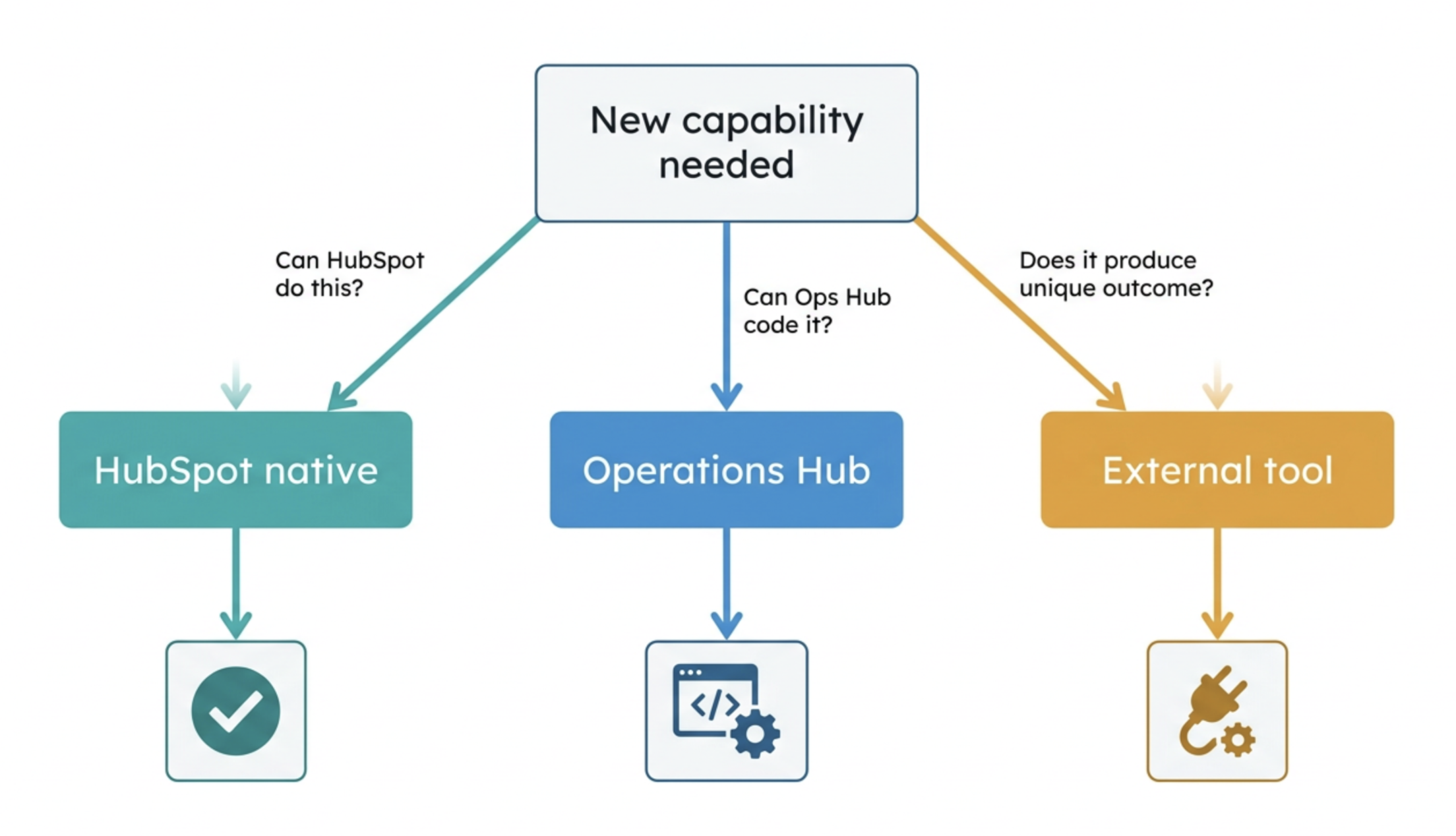
Operations Hub is HubSpot's most underestimated product — and the one most frequently replaced by a stack of third-party tools before it has been properly evaluated. The build vs buy decision in HubSpot RevOps is not a philosophical preference. It is a structured decision with specific criteria, and making it wrong in either direction creates compounding cost and complexity.
- What Operations Hub actually is — and what it is not
- The three capability categories of Operations Hub
- The build vs buy decision framework
- Use case analysis: Operations Hub vs external tools head-to-head
- Where external tools genuinely outperform Operations Hub
- The hidden cost of third-party tool sprawl
- The integration architecture decision: native, middleware, or API
- Building a rational RevOps tech stack around HubSpot
What Operations Hub actually is — and what it is not
Operations Hub is HubSpot's programmable data layer — the product that sits between your CRM data and your workflows and makes both more intelligent. It is the answer to three specific RevOps problems that the rest of HubSpot's native toolset cannot solve: data quality at the point of entry, complex business logic in automation, and reliable two-way data sync with external systems.
What Operations Hub is not: a replacement for every third-party tool in your stack. It is not an ETL platform, a full data warehouse, a business intelligence layer, or a dedicated integration platform with enterprise-grade monitoring and alerting. Understanding both what it does and what it does not do is the prerequisite for making rational build vs buy decisions in a HubSpot RevOps context.
The most common Operations Hub misconception: that its custom coded actions make it equivalent to a full development environment. JavaScript in a HubSpot workflow runs in a constrained environment with execution time limits, memory limits, and no persistent state between executions. It is powerful for targeted automation logic — it is not a replacement for application development.
The build vs buy decision in RevOps is not primarily about cost. It is about maintenance burden, data latency, failure surface area, and governance overhead. A third-party tool that costs $200/month but requires three integrations, introduces a 4-hour data sync lag, and fails silently when the API key expires may be far more expensive in total operational cost than an Operations Hub solution that costs $800/month more but runs natively with no sync delay and no integration failure risk.
The three capability categories of Operations Hub
The build vs buy decision framework
Every RevOps tool decision — whether to use Operations Hub, a dedicated third-party tool, or a custom API integration — should be evaluated against five criteria. The team that asks all five before making a decision makes significantly fewer expensive reversals than the team that decides based on cost alone or developer familiarity.
Use case analysis: Operations Hub vs external tools head-to-head
| Use case | Operations Hub | External tool |
|---|---|---|
| Phone number formatting at contact creation | OPS HUB WINS Native data quality workflow. Runs on every record creation. No external dependency, no sync delay, full audit trail in HubSpot. | Zapier can do this but introduces a delay and requires a separate Zap to manage. Adds an external dependency for a function that runs on every contact record. |
| Two-way sync with Salesforce | OPS HUB WINS Native Salesforce sync with field-level mapping, filtering, and conflict resolution. Real-time. More reliable than any middleware alternative for high-volume bidirectional sync. | Zapier/Make can achieve this but with higher latency and higher failure risk at volume. Custom API is more reliable but requires development resources. |
| Complex lead scoring with weighted inputs | OPS HUB WINS Custom coded action calculates composite score from multiple properties, applies weights, writes result to Contact. Runs on any property change trigger. No external system required. | Madkudu, Breadcrumbs, and similar tools offer more sophisticated ML-based scoring models. Justified when scoring complexity exceeds what JavaScript in a workflow can reasonably maintain. |
| Contact data enrichment (Clearbit, Apollo) | DEPENDS Operations Hub coded action can call enrichment API and write results to HubSpot properties. Works well for moderate volume. At high volume, enrichment API calls within workflow coded actions can hit execution time limits. | Native Clearbit or Apollo HubSpot integrations handle enrichment more reliably at high volume and with better deduplication logic. Prefer native integrations for enrichment at scale. |
| Email deliverability and list hygiene | EXTERNAL WINS Operations Hub does not have native email validation or deliverability scoring capability. This is a genuine gap. | NeverBounce, ZeroBounce, or Kickbox integrated via Operations Hub coded action or native connector. External tools are required for email validation — Operations Hub provides the workflow trigger and property write, but the validation logic lives in the external tool. |
| Advanced deduplication at scale | DEPENDS HubSpot's native dedup tools handle basic email-based deduplication adequately. Operations Hub coded actions can implement more complex dedup logic — but at high volume, execution time constraints become a limiting factor. | Dedupely or Insycle offer more sophisticated deduplication rules, bulk merge capabilities, and scheduled dedup runs that are more appropriate for portals with 100,000+ contacts and complex dedup criteria. |
| Webhook-based event processing from product | OPS HUB WINS Operations Hub can receive webhook payloads via HubSpot's custom webhook trigger and process them in a coded action — writing product usage events to Contact properties without an intermediary. | Segment, Rudderstack, or a custom event pipeline are appropriate when event volume is very high (millions of events/day) or when the same event stream feeds multiple downstream tools beyond HubSpot. |
| Advanced reporting and business intelligence | EXTERNAL WINS HubSpot's reporting builder, even with Operations Hub, cannot replace a dedicated BI layer for complex cross-object analysis, cohort modelling, or multi-source data aggregation. | Looker, Tableau, Power BI, or Metabase pulling from HubSpot's API. For any reporting requirement that involves joining HubSpot data with external financial, product, or operational data, a BI layer is required. Operations Hub does not change this. |
Where external tools genuinely outperform Operations Hub
Intellectual honesty about Operations Hub's genuine limitations is more useful than advocacy. There are capability categories where external tools are not merely alternatives — they are materially better choices regardless of how well Operations Hub is configured.
The hidden cost of third-party tool sprawl
Every third-party tool added to a HubSpot tech stack introduces costs that do not appear on the tool's pricing page. The RevOps teams that manage the most effective stacks are not the ones with the most tools — they are the ones that have been most ruthless about eliminating tools that duplicate native HubSpot capability or create more integration overhead than commercial value.
| Hidden cost category | Description | Typical impact |
|---|---|---|
| Integration maintenance | Every tool connected to HubSpot requires ongoing maintenance — field mapping updates when either system changes its data model, API key rotation, error monitoring, and periodic re-testing after platform updates. | 0.5–2 hours/month per integration at steady state. More after major platform updates from either vendor. |
| Data latency and inconsistency | Data synced through middleware or periodic batch processes is never fully current. Sales reps making decisions on data that is 4 hours stale make different — and sometimes worse — decisions than those with real-time data. | Qualitative impact on deal quality and routing accuracy that is difficult to quantify but consistently reported by sales teams using high-latency integrations. |
| Training and onboarding | Every tool added to the stack increases the onboarding surface area for new RevOps team members and new sales users. A stack with 8 integrated tools requires 8 tool-specific training sessions. | 2–4 additional weeks of productive ramp time per new RevOps hire per 5 tools beyond the HubSpot core. |
| Vendor management overhead | Annual contract renewals, pricing negotiations, support escalations, security reviews, and compliance assessments for each vendor. At 10 tools, this is a meaningful recurring time investment with no direct commercial return. | 4–8 hours per vendor per year at minimum. More for enterprise contracts requiring security and legal review. |
| Attribution contamination | Tools that interact with contacts outside HubSpot — sending emails, logging activities, updating properties — create attribution gaps. HubSpot sees only the interactions it was involved in directly. | Attribution data incompleteness that proportionally degrades with each tool added to the customer-facing stack. |
The tool sprawl audit question every RevOps team should ask annually: for each tool in the stack, can we articulate a specific commercial outcome that this tool produces that HubSpot cannot produce natively or with Operations Hub? If the answer is no, or if the answer is "it was already here when I joined," that tool is a candidate for elimination. A smaller, more deeply integrated stack almost always outperforms a larger, more fragmented one — both commercially and operationally.
The integration architecture decision: native, middleware, or API
When an external tool genuinely outperforms Operations Hub for a specific use case, the integration architecture decision — how to connect it to HubSpot — is the second decision that must be made deliberately. Three options exist, each with distinct trade-offs.
Native HubSpot integration (App Marketplace)
The lowest-friction option. Pre-built connectors maintained by the tool vendor or HubSpot. Limited field mapping customisation. Appropriate when the native integration covers all required data flows and the default field mapping reflects your data model. Do not compromise your data model to fit a native integration — if the native connector requires you to misuse HubSpot properties to achieve the mapping, a custom approach is preferable.
Operations Hub data sync
Two-way, near real-time sync with configurable field mapping, filtering, and conflict resolution. Appropriate for the 100+ tools supported natively by Operations Hub where the native App Marketplace integration does not provide bidirectional sync. Higher configuration capability than a native integration; lower maintenance burden than a custom API integration.
Custom API integration
Full control over data flows, field mapping, sync frequency, and error handling. Required when the tool is not supported by Operations Hub's native sync, when the data flow logic is too complex for middleware, or when data volume and reliability requirements exceed what middleware can deliver. The highest upfront cost and the highest long-term maintenance burden. Requires either internal development resource or a managed integration service.
The integration architecture decision hierarchy: always evaluate native integration first. If native integration covers requirements, use it. If it does not, evaluate Operations Hub data sync. If that is insufficient, use middleware (Zapier/Make) only for low-volume, low-criticality flows. Use custom API for high-volume, high-criticality, or high-complexity flows where reliability and auditability are requirements. Never use middleware for revenue-critical data flows — the failure modes are too opaque and the recovery too manual.
Building a rational RevOps tech stack around HubSpot
A rational RevOps tech stack around HubSpot starts from a simple principle: HubSpot is the system of record and the automation engine. Every other tool in the stack either feeds data into HubSpot, receives data from HubSpot, or performs a specific function that HubSpot cannot perform natively. No tool should exist in the stack that duplicates native HubSpot capability.
The stack audit framework — applied annually to every tool in the RevOps stack:
- Can HubSpot do this natively? If yes — and the native capability meets the actual requirement rather than an idealised version of it — eliminate the external tool.
- Can Operations Hub do this with a coded action? If yes, and the development and maintenance cost is lower than the external tool's total cost of ownership — build it.
- Does this tool produce a specific commercial outcome that HubSpot cannot? If yes, and the outcome is measurable and material — keep it, integrate it properly, and assign an owner.
- Is this tool's data flowing into HubSpot reliably and completely? If no — the tool is creating attribution gaps and data inconsistency regardless of how good it is in isolation. Fix the integration or eliminate the tool.
→For the Operations Hub automation architecture patterns used to implement the build decisions described in this blog, see Article: Automating revenue workflows using HubSpot Operations Hub.