
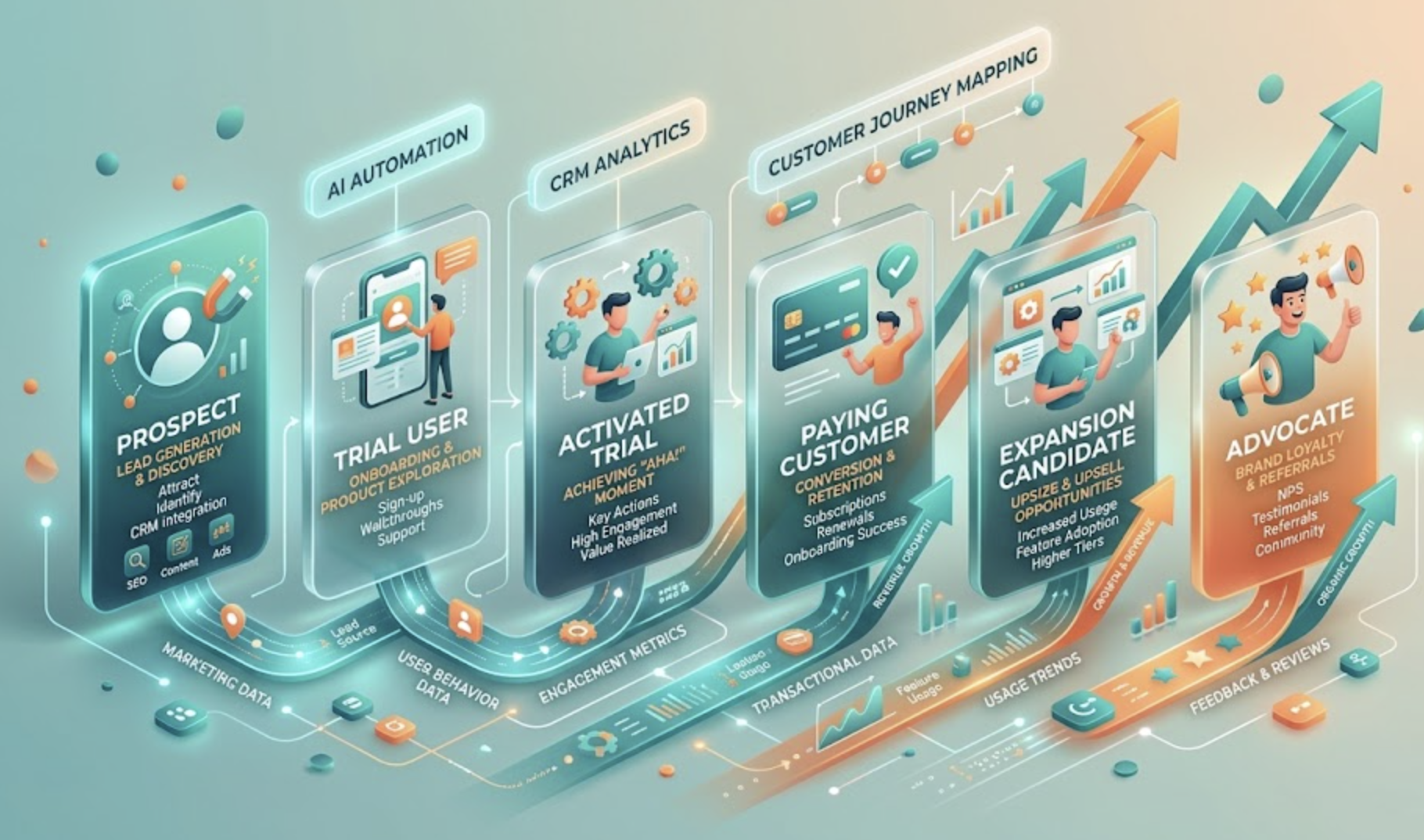
HubSpot's default lifecycle stages were designed for a linear B2B sales motion. SaaS doesn't work that way. Here is how to rebuild your lifecycle architecture in HubSpot to reflect how SaaS customers actually move from stranger to advocate — and every revenue-critical stage in between.
- Why HubSpot's default lifecycle stages fail SaaS companies
- The SaaS lifecycle model: six stages that reflect reality
- Mapping each stage in HubSpot: properties, triggers, and criteria
- The PLG vs sales-led lifecycle: where the architecture diverges
- Trial and activation: the stages most SaaS teams miss
- Expansion as a lifecycle stage — not a one-off event
- The HubSpot objects you need for full lifecycle visibility
- Common SaaS lifecycle mistakes and how to fix them
Why HubSpot's default lifecycle stages fail SaaS companies
HubSpot ships with seven lifecycle stages: Subscriber, Lead, Marketing Qualified Lead, Sales Qualified Lead, Opportunity, Customer, and Evangelist. For a traditional B2B company with a defined sales cycle and a clear moment of purchase, these seven stages map reasonably well onto reality.
SaaS is not that company. A SaaS customer's journey typically looks nothing like a linear sales funnel. It looks like this: a user signs up for a free trial without ever talking to Sales. They use the product inconsistently for two weeks. A product-led signal — a specific feature activation or usage threshold — flags them as genuinely engaged. An SDR reaches out. They convert to paid. Three months later, their company adds five seats. Eight months later, they upgrade to the enterprise plan.
Where in HubSpot's seven default stages does "activated trial user who hasn't spoken to Sales" live? Where does "expansion opportunity on an existing customer" get tracked? The honest answer: nowhere cleanly. And when the lifecycle architecture doesn't reflect reality, every report built on top of it tells a distorted story.
The most expensive lifecycle mapping mistake a SaaS company makes in HubSpot is treating "Customer" as a terminal stage. In SaaS, the customer relationship is a revenue motion — expansion, upsell, and cross-sell are as measurable as initial acquisition. A lifecycle that ends at "Customer" makes that revenue invisible.
The SaaS lifecycle model: six stages that reflect reality
Before configuring anything in HubSpot, the lifecycle model must be defined in language that reflects your specific SaaS business. The framework below is a starting point — not a mandate. Every SaaS company has nuances in how users acquire, activate, and expand that must be reflected in the final model.
Mapping each stage in HubSpot: properties, triggers, and criteria
Each lifecycle stage requires three things to function correctly in HubSpot: a property set that captures the data relevant to that stage, a trigger that advances the contact into that stage, and an exit condition that moves them out.
The most commonly missing component is the exit condition. Lifecycle stages in most SaaS HubSpot portals are one-way gates — contacts advance forward but never regress or exit. This creates two problems: it inflates counts at every stage, and it prevents re-engagement logic from firing when a trial expires without converting or when a customer shows churn signals.
Define exit conditions for every stage at the same time you define entry conditions. A trial user whose trial expires without activating should not remain in the Trial User stage indefinitely — they should regress to a re-engagement sequence. An expansion candidate who is approached and declines should move to a hold stage, not remain as an active expansion opportunity that inflates your CS pipeline.
| Stage | Key HubSpot properties to populate | Exit condition |
|---|---|---|
| Prospect | Lead source, ICP score, first page seen, intent signal type | Trial created → advances to Trial User. 30 days inactive → moves to Disqualified. |
| Trial user | Trial start date, trial end date, trial type (free/paid), activation status | Activation event → advances to Activated Trial. Trial expires without activation → re-engagement sequence. |
| Activated trial | Activation event name, activation date, ICP fit score, SDR owner assigned | Payment confirmed → Paying Customer. 14 days post-activation without conversion → nurture sequence resumes. |
| Paying customer | MRR, plan tier, billing frequency, renewal date, CSM owner | Usage signals met → Expansion Candidate. Payment failed → At-Risk workflow triggered. |
| Expansion candidate | Expansion type, expansion deal ID, seat utilisation %, feature limit proximity | Expansion deal closed → MRR updated, stage returns to Paying Customer at new tier. Declined → hold for 90 days. |
| Advocate | NPS score, referral action type, case study status, referral contact IDs | No active condition — advocates remain unless NPS drops below 7, which triggers re-evaluation workflow. |
The PLG vs sales-led lifecycle: where the architecture diverges
Product-led growth and sales-led SaaS companies use the same six lifecycle stages, but the configuration logic at stages two and three — Trial User and Activated Trial — is fundamentally different.
Product-led growth (PLG)
The activation event is the conversion signal. Sales involvement is triggered by a combination of activation + ICP fit, not by a rep's manual review. Most trial users never speak to Sales — they convert via in-app prompts or email sequences. HubSpot's role is to track product signals, score them against ICP criteria, and surface only the highest-value activated trials to SDRs. Volume is high; manual review is low.
Sales-led SaaS
Trials are often not self-serve — they require Sales involvement from the start. The lifecycle is closer to traditional B2B: demo request → discovery → trial as proof of concept → close. HubSpot's role is to track deal stage alongside trial status, ensuring that the technical evaluation (trial) and the commercial evaluation (deal) are synchronised in the CRM and visible in one view.
Hybrid (PLG + sales-assist)
The most common model for scaling SaaS companies — self-serve for SMB, sales-assisted for mid-market, fully sales-led for enterprise. Requires three parallel lifecycle tracks in HubSpot: automated PLG track, SDR-assisted track, and full sales track. Each has different triggers, different handoff points, and different pipeline views. The architecture complexity is significant but the revenue coverage is complete.
Enterprise SaaS
Trials are replaced by proof-of-concept (POC) engagements with defined success criteria, executive sponsors, and security review stages. The lifecycle in HubSpot must accommodate multi-threaded deals — multiple contacts at different stages within the same account. Account-level lifecycle status is as important as contact-level, requiring Company object lifecycle properties alongside Contact lifecycle stages.
Trial and activation: the stages most SaaS teams miss
Of the six lifecycle stages in the SaaS model, Trial User and Activated Trial are the two that most HubSpot portals either omit entirely or implement incorrectly. The reason is technical: these stages require product data to be synced into HubSpot — and that integration is typically deferred until "later," which in practice means never.
The consequence is significant. Without trial and activation data in HubSpot, you cannot measure trial-to-paid conversion rate by source, by ICP tier, or by activation path. You cannot trigger SDR outreach based on activation signals. You cannot build re-engagement sequences for expired trials. You are operating a SaaS revenue model without visibility into its most critical conversion point.
Minimum viable trial data sync — what HubSpot needs from your product:
Contact properties (populated via API or Ops Hub):
— Trial start date (date)
— Trial end date (date)
— Trial type: free / paid / POC (dropdown)
— Activation status: not activated / activated (checkbox)
— Activation date (date)
— Activation event name (text — e.g. "First report created")
— Days to activation (calculated: activation date - trial start date)
— Trial outcome: converted / expired / churned (dropdown)
Company properties:
— Active trial users count (number, synced from product)
— Highest seat tier reached in trial (dropdown)
— Team size in trial (number)
Expansion as a lifecycle stage — not a one-off event
Expansion revenue — upgrades, seat additions, cross-sells — is the highest-margin revenue a SaaS company generates. The customer has already been acquired. The relationship exists. The trust has been established. The only question is whether the revenue growth opportunity is visible, tracked, and systematically pursued.
In most SaaS HubSpot portals, expansion is invisible. When a customer upgrades, the billing system records it and the finance team sees it — but HubSpot shows nothing. No deal was created. No lifecycle stage changed. No CS activity was logged. The expansion happened outside the CRM, which means it cannot be attributed, cannot be forecasted, and cannot be managed as a repeatable process.
Treat expansion as a parallel pipeline with its own deal stages, its own pipeline view, and its own set of KPIs tracked in HubSpot. Expansion ARR should be visible alongside new ARR in your revenue dashboard. A CS team that cannot see their expansion pipeline in HubSpot is a team operating on instinct rather than data — and leaving compoundable revenue on the table.
The expansion pipeline in HubSpot requires:
- A dedicated CS pipeline with deal stages reflecting the expansion motion: Identified → Qualified → Proposed → Negotiating → Expanded
- Expansion deal type property to distinguish upsell, cross-sell, and seat expansion for attribution analysis
- Automated deal creation triggered by product usage signals — seat utilisation, feature limit proximity, new team member detection
- MRR delta property updated on the Company record whenever an expansion deal closes
The HubSpot objects you need for full lifecycle visibility
Full SaaS lifecycle visibility in HubSpot requires four objects working together — two native, two custom:
- Contact: the individual user, carrying lifecycle stage, trial properties, product usage signals, and NPS score
- Company: the account, carrying account-level health score, total MRR, seat count, plan tier, and renewal date
- Subscription (custom object): the individual subscription record, carrying plan tier, MRR, billing frequency, contract start and end date — associated to Company and to the Deal that created it
- Expansion deal (Deal object, CS pipeline): the tracked expansion opportunity, associated to Company, to the CS owner, and to the Subscription it would modify
Common SaaS lifecycle mistakes and how to fix them
- Using "Customer" as a terminal stage. Fix: rename it "Active Customer" and create Expansion Candidate and Advocate as subsequent stages with explicit entry criteria.
- Not syncing trial data from the product. Fix: implement the minimum viable trial data sync outlined in Section 5 as a prerequisite for any lifecycle reporting. Without it, your funnel reports are missing their most important conversion point.
- Tracking lifecycle at Contact level only. Fix: mirror critical lifecycle properties at the Company level — account-level health score, plan tier, MRR — so that account-based reporting and CS workflows function correctly.
- Building PLG and sales-led tracks in the same workflow. Fix: create separate lifecycle workflows for each motion with explicit branching logic at the point of entry. Mixing them creates enrollment conflicts and lifecycle stage inconsistencies.
- No regression logic for expired trials. Fix: build a trial expiry workflow that fires when trial end date is reached and activation status is still false. Route to a re-engagement sequence. Do not leave expired trials in the Trial User stage — they distort your conversion rate metrics.